AuthoredUp Pricing Explained: Plans, Limits & Value
Full AuthoredUp pricing breakdown for 2026: free plan limits, Individual vs Business plan costs, and how it compares to Taplio, Shield, and Hypelio.
The Hypelio team
November 14, 2026
AuthoredUp Pricing Explained: Plans, Limits & Value
📅 ⏱ 16 min read📝 ~3100 words
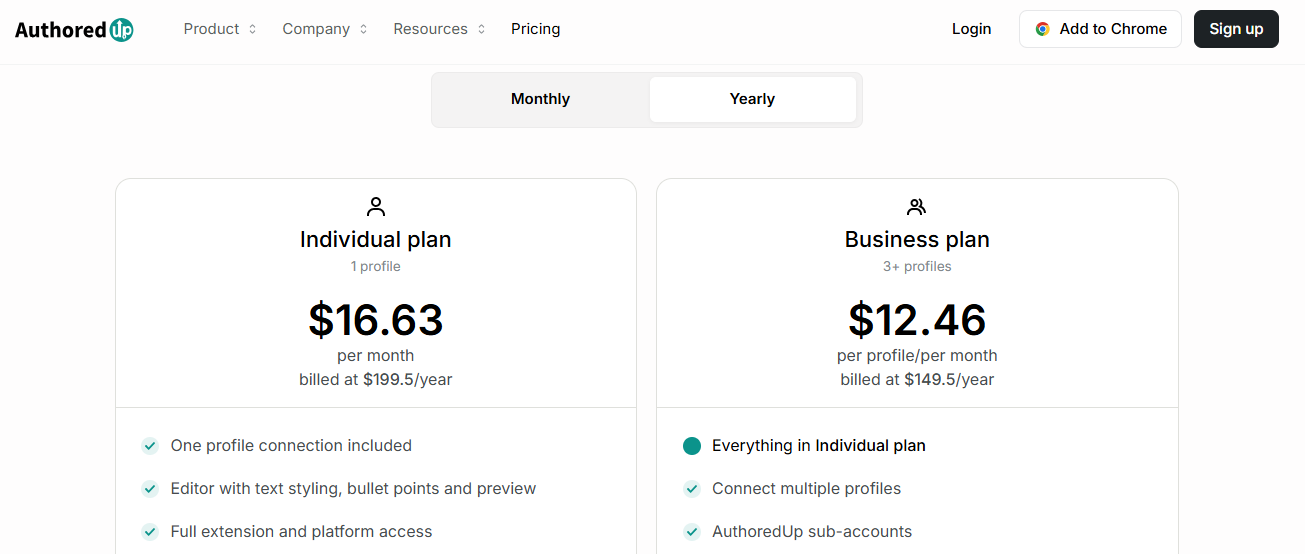
AuthoredUp pricing runs from a free tier with meaningful caps up to a Business plan designed for teams — but the number that matters most depends entirely on how many LinkedIn profiles you are managing. A solo creator pays $19.95/month (or $16.63/month billed annually). Agencies adding three or more profiles switch to the Business model at $14.95/month per profile (monthly) or $12.46/month per profile billed annually. A pattern observed across LinkedIn tool buyers is that most price comparisons focus on the headline monthly rate and miss the per-seat versus per-account billing distinction — which is where real cost differences emerge at scale.
Key Takeaways
Free plan exists but caps drafts, analytics history, and post saves — it's a genuine trial, not a long-term working setup for active creators.
Individual plan: $19.95/month (or $16.63/month annual) for one profile — covers unlimited drafts, full formatting toolkit, and analytics.
Business plan: $14.95/month per profile (minimum 3 profiles) — cheaper per seat at scale but costs multiply across clients.
AuthoredUp is a content creation and analytics layer, not a standalone scheduler — it relies on LinkedIn's native scheduler for publishing.
Agencies managing 5+ client accounts typically find per-account platforms like Hypelio more cost-effective, once multi-profile costs are totalled.
Most counterintuitive finding: AuthoredUp's cheapest plan isn't always its best value — the annual Individual plan often beats monthly Business pricing for solo ghostwriters managing one primary client profile.
AuthoredUp is a LinkedIn-native browser extension for content creation, formatting, and post-level analytics — not a full-stack scheduler or CRM. It lives inside LinkedIn itself, accessed via a Chrome or Edge extension, and enhances what you can do directly on the platform rather than replacing it. That distinction matters when you are evaluating pricing: you are paying for a content creation and analytics layer, not a posting platform.
The core workflow is straightforward. You draft posts inside the AuthoredUp editor, apply rich formatting — bold, italics, custom bullet styles, text hooks — and preview exactly how the post will render across devices before it goes live. Publishing runs through LinkedIn's own native scheduler. No third-party API handshake means lower suspension risk compared to tools that post on your behalf.
Key features include:
A post library for saving, organising, and reusing draft content
Content analytics tracking impressions, engagement, and format performance at the post level
A snippet and hook library with 300+ pre-built opening lines and endings
Hashtag and emoji toolkits integrated directly into the editor
LinkedIn newsletter promotion tool features that surface your newsletter inside posts more effectively
Multi-device preview (desktop, tablet, mobile) before you publish
💡
Pro Tip:AuthoredUp's post preview is one of its most underrated features. LinkedIn's own composer doesn't accurately show how line breaks and formatting render on mobile — AuthoredUp does, which saves the embarrassment of a wall-of-text post on smaller screens.
AuthoredUp LinkedIn Newsletter Promotion Tool Features
The authoredup linkedin newsletter promotion tool features sit within the paid tiers and allow creators to embed newsletter CTAs, track newsletter-driven engagement, and analyse which post formats drive the most newsletter subscribers. It is a niche but genuinely useful add-on for creators who publish long-form LinkedIn content alongside their feed posts. For most buyers, though, it is secondary to the core formatting and analytics value.
AuthoredUp Plans and Features: Full 2026 Breakdown
AuthoredUp Plans and Features: Full 2026 Breakdown Add a caption...
Three tiers define the AuthoredUp plans and features structure: a free plan, an Individual paid plan, and a Business plan. Here is what each actually delivers — and where each one runs into its limits.
AuthoredUp Individual plan — full formatting toolkit, unlimited drafts, and post analytics for one LinkedIn profile
How Much Does AuthoredUp Cost Per Month?
How much does AuthoredUp cost per month depends on the plan and billing cycle. The Individual plan is $19.95/month on a monthly basis, dropping to an effective $16.63/month when billed annually at $199.50/year — a saving of roughly 17%. The Business plan at $14.95/month per profile (monthly) or $12.46/month per profile (annually, billed at $149.50/year per profile) is cheaper per seat, but the minimum of three profiles means your base commitment starts at $44.85/month on the monthly Business plan.
In practice, a solo ghostwriter managing one client profile is best served by the Individual annual plan. An agency handling four client accounts on Business annual billing pays roughly $49.84/month total — about $12.46 × 4. That is a meaningful number to compare against Taplio alternatives and other LinkedIn scheduling tool cost breakdowns before committing.
What Does the AuthoredUp Free Plan Include — and Where It Hits Its Limits
The AuthoredUp free plan gives you access to the core editor, basic formatting, and a limited number of saved posts and drafts. Analytics history is restricted to a shorter lookback window, and the hook/snippet library is partially gated. What does the AuthoredUp free plan include that is genuinely useful: multi-device post preview, basic hashtag tools, and a feel for the editing workflow before you pay anything.
Where it hits its limits quickly:
Draft and post save caps mean active creators run out of storage within weeks of consistent posting
Analytics history is too short to identify meaningful trends in content performance
Advanced snippet categories and the full hook library require a paid plan
The free plan is a genuine trial, not a viable long-term setup. Creators publishing more than a few times a week will hit the walls fast. When that happens, the upgrade prompt appears — which is exactly when you want to know what the paid plans actually cost before clicking through.
⚠️
Warning:AuthoredUp's free plan does not auto-convert to a paid plan — when you hit your limits, your drafts remain accessible but you can no longer save new ones. Any drafts stored under a free account stay in place if you upgrade, but it is worth exporting important content before any plan changes.
AuthoredUp vs. Taplio and Other LinkedIn Tool Pricing Compared
AuthoredUp vs. Taplio
Four tools dominate the LinkedIn content tool pricing conversation in 2026. Each occupies a different niche, and the right choice depends less on price than on how many accounts you manage and what workflow you actually need.
Taplio pricing data sourced from Contentin's 2026 AuthoredUp alternatives comparison. AuthoredUp vs Taplio pricing in plain terms: Taplio costs roughly 2× AuthoredUp for a solo plan, adds AI content generation and lead database features, but doesn't offer a meaningfully better content formatting experience. For creators whose primary need is drafting and analytics rather than AI writing assistance, that premium is hard to justify.
The LinkedIn content tool that wins on price comparison isn't always the one that wins on cost — once you account for the number of profiles you are managing, a $12/month plan can easily outprice a $20/month one.
Best AuthoredUp Alternatives for LinkedIn Creators in 2026
The best AuthoredUp alternative for LinkedIn creators depends on what you are missing from AuthoredUp's offering:
Need AI writing assistance: Taplio's Standard plan ($69/month) adds 250 AI credits monthly alongside scheduling and CRM features — worth it if content volume is the bottleneck, less so if formatting is.
Need pure analytics at lower cost: Shield Analytics covers post-level and profile-level performance tracking for $8–25/month without the content creation layer.
Managing multiple client accounts as an agency or ghostwriter:Hypelio's multi-account workspace lets you run multiple LinkedIn profiles under one login — no client passwords required, with separate voice-based story banks per client, approval workflows, and scheduling tools calibrated per audience. Per-account billing makes it structurally cheaper than stacking AuthoredUp Business seats for every client.
When comparing the best LinkedIn content creation tools 2024 and into 2026, the category has split clearly: single-creator tools with rich formatting (AuthoredUp territory) versus agency-first platforms with client management infrastructure (Hypelio's territory). The mistake is trying to stretch a solo tool into an agency workflow — the billing maths and feature gaps make that painful fast.
Managing LinkedIn for more than one client?
Hypelio handles multi-account LinkedIn management with separate voice banks, approval workflows, and reporting — without asking for client passwords.
Is AuthoredUp Worth It? Value, Limitations & Who It's Really For
Teams that use AuthoredUp primarily for formatting and post-level analytics consistently report that the tool pays for itself in time saved — specifically in the preview and formatting workflow that LinkedIn's native composer handles poorly. For a solo creator publishing four or more times per week, $19.95/month is a reasonable LinkedIn scheduling tool cost compared to the alternative of manually debugging mobile formatting after every post.
Is AuthoredUp worth it for your specific use case? Run this quick check:
✓ Worth it: You post consistently (3+ times/week), care about formatting precision, and want granular per-post analytics — the Individual plan delivers real ROI at that volume.
✓ Worth it: You are a solo ghostwriter managing one client's LinkedIn voice — formatting, drafts, and analytics all in one place at under $20/month.
✗ Less worth it: You manage five or more client accounts — Business plan costs stack to $74.75+/month (monthly billing, five profiles), at which point agency-purpose-built tools with client workflows offer better value.
✗ Less worth it: You need a mobile app — AuthoredUp is extension-only, Chrome and Edge only.
🔴
Avoid:Paying for AuthoredUp's Business plan when you are managing accounts across different client teams — the tool has no client-facing approval workflow or multi-workspace logic. You will pay multi-profile pricing for a tool still built around one person's workflow.
Can I Use AuthoredUp for Multiple LinkedIn Accounts?
Can I use AuthoredUp for multiple LinkedIn accounts — yes, but with caveats. The Business plan supports three or more profiles, billed individually per profile. Each profile has its own draft library and analytics. What it does not have: a shared workspace view across clients, client-facing approval links, or a way to manage multiple accounts without switching between them manually.
For a freelance ghostwriter managing two or three clients with similar workflows, this is workable. For an agency with five-plus active clients expecting separate reporting and content approval processes, it creates friction. The per-seat versus per-account billing model in AuthoredUp means each profile costs the same regardless of posting volume — a light-posting client costs the same as your highest-volume account. That flat structure works at small scale and becomes inefficient at larger ones.
Cancellation Policy, Refunds & What Happens to Your Data
AuthoredUp operates on a subscription model with no publicly listed money-back guarantee. Cancellation stops future billing, but it is worth confirming directly with their support team whether mid-cycle refunds are available — their policy is not prominently published, which is a gap worth flagging before you buy.
What happens to your data after cancellation: your saved drafts, post library, and analytics history are retained for a grace period but access is restricted once a plan lapses. Before cancelling, export your post library — AuthoredUp allows this — so you are not locked out of content you have built over months. This is especially important for ghostwriters whose draft libraries represent client work product.
✓ Before You Subscribe to AuthoredUp — Checklist
☐Confirm you use Chrome or Edge — AuthoredUp is extension-only, no mobile or Firefox support
☐Count your actual LinkedIn profiles — solo (Individual plan) vs. 3+ profiles (Business plan)
☐Check whether you need client approval workflows — AuthoredUp has none; factor this into your tool choice
☐Compare annual vs. monthly pricing — annual saves ~17% on Individual, ~17% on Business per profile
☐Confirm the refund and cancellation policy directly with support before entering payment details
☐Test the free plan for at least one week before upgrading — it reveals real workflow fit better than any review
AuthoredUp Review: What Real Users Say About the Pricing and Features
AuthoredUp Review
What separates AuthoredUp from most LinkedIn formatting tools is the consistency of praise for its post preview accuracy — in an AuthoredUp review context, that feature comes up more than any other as the reason users stay subscribed. LinkedIn's native composer has a known gap: what you see while drafting is not reliably what your audience sees, especially on mobile. AuthoredUp closes that gap, and creators who have been burned by broken formatting mid-campaign cite it as worth the subscription cost alone.
Critical feedback clusters in three consistent areas across reviews and community discussions:
Extension-only model: No mobile app, no Firefox — a hard stop for creators who draft on the go or on devices outside Chrome/Edge's ecosystem
No native scheduling: Publishing still routes through LinkedIn's own scheduler, which limits the automation possible compared to tools with direct API posting
Per-profile costs at scale: Agency users managing more than four or five client profiles report that Business plan pricing becomes difficult to justify when competing platforms offer client collaboration features at comparable total costs
Solo creators on the Individual annual plan — particularly freelance ghostwriters managing one or two accounts — report the highest satisfaction. The LinkedIn content tool value for money is strongest here: post-level analytics surface which content formats perform, the hook library speeds up drafting, and the formatting toolkit removes the formatting-guesswork step from the publishing workflow entirely.
The most common failure mode among agency users is treating AuthoredUp as a client management platform. It is not — and buyers who evaluate it expecting shared client dashboards, branded reporting, or approval links tend to find it falls short. For those workflows, tools built around ghostwriter and agency LinkedIn plans like Hypelio's analytics and reporting system fill the gap AuthoredUp intentionally leaves open.
AuthoredUp is an excellent tool used in the wrong context far too often. Used for what it is — a solo creator's formatting and analytics layer — it earns its price comfortably. Used as an agency platform, it creates friction that no amount of workarounds can fully resolve.
Need LinkedIn content tools built for agencies and ghostwriters?
Hypelio (rated 4.8/5 on G2, used by teams at Google, Meta, and Goldman Sachs) is built specifically for managing multiple LinkedIn profiles with per-account pricing, client approval workflows, and voice-based content capture.
Frequently Asked Questions About AuthoredUp Pricing
Is AuthoredUp free or does it require a paid subscription?
AuthoredUp offers a genuinely free plan with no credit card required. It includes the core editor, basic formatting tools, and a limited post library. For active creators publishing more than a few times per week, the free plan's caps on saved drafts and analytics history make a paid upgrade necessary within the first month of regular use.
What is the best AuthoredUp plan for a solo LinkedIn creator?
The Individual annual plan at $16.63/month (billed $199.50/year) is the strongest value for a solo creator. It covers one profile fully — unlimited drafts, complete analytics history, the full hook and snippet library — and the annual saving over monthly billing pays for roughly one and a half months of the subscription each year.
How does AuthoredUp pricing compare to other LinkedIn tools?
AuthoredUp sits below Taplio ($39+/month) and above Shield Analytics ($8–25/month) in the LinkedIn tool pricing stack. It is cheaper than Taplio for solo creators who do not need AI writing credits, but more expensive than Shield for users who only need analytics. Agencies comparing authoredup linkedin costs against multi-account platforms should account for per-profile multiplication — five profiles on AuthoredUp Business costs roughly $74.75/month on monthly billing.
What happens when you hit AuthoredUp usage limits on the free plan?
When you hit AuthoredUp usage limits on the free plan, you can still view existing saved drafts and posts but cannot save new ones. The tool prompts you to upgrade rather than auto-deleting content. Your existing library remains intact if you upgrade, but exporting important drafts before any plan changes is strongly recommended as a precaution.
Does AuthoredUp offer a discount or coupon code?
Does AuthoredUp offer a discount or coupon — yes, in two reliable forms. Annual billing saves roughly 17% compared to monthly on both Individual and Business plans. Promotional coupon codes appear periodically via their newsletter and partner channels. No persistent public coupon code is permanently available, so checking their pricing page directly before subscribing is the most reliable approach.
Is there a money-back guarantee or refund policy?
AuthoredUp does not prominently publish a money-back guarantee. Their cancellation stops future billing cycles, but mid-cycle refund availability is not confirmed in their public documentation. Contact their support team directly before subscribing if a refund guarantee is important to your decision — the answer will be current and account-specific in a way no third-party review can provide.
Can I use AuthoredUp for multiple LinkedIn accounts?
Yes — the Business plan supports three or more profiles at $14.95/month per profile (monthly) or $12.46/month per profile (annually). Each profile has its own analytics and draft library. There is no shared workspace dashboard or client-facing approval flow across profiles, which makes this model better suited to small teams than to agencies running active multi-client operations simultaneously.
What consistently separates LinkedIn tool buyers who get genuine ROI from those who churn within 90 days is not which tool they chose — it is whether the tool's billing model matched the number of accounts they were actually managing. AuthoredUp's pricing is fair and transparent for the solo-creator use case it was built for. The buyers who struggle with it are invariably the ones who needed an agency-first platform and bought a creator-first one instead.
Written by the team behind Hypelio. We publish what we have actually seen work across the accounts we help run — and say so plainly when something did not.
Writing the post is the easy part
The hard part is the next one, and the one after that, still sounding like you. Hypelio drafts in your voice, keeps the queue full, and works the same whether you run one account or twenty.