7 Best ContentIn Alternatives for LinkedIn in 2026
Comparing the 7 best ContentIn alternatives for LinkedIn in 2026 — covering AI writing, scheduling, multi-account support, client workflows, and honest pricing.
The Hypelio team
November 25, 2026
7 Best ContentIn Alternatives for LinkedIn in 2026
📅 ⏱ 14 min read📝 ~2700 words
ContentIn alternatives worth switching to in 2026 include Hypelio, Taplio, Shield Analytics, Supergrow, Buffer, AuthoredUp, and Hootsuite — each solving a different gap. A pattern observed across agencies and ghostwriters leaving ContentIn is that the trigger is almost never the AI writing quality. It is the moment they need to manage a second client account, set up a client approval process, or get analytics that go beyond post-level vanity numbers. ContentIn works for solo creators doing simple personal branding. The moment your workflow grows, the tool quietly stops fitting.
Key Takeaways
Who this is for: Creators, ghostwriters, founders, and agencies managing LinkedIn content in 2026.
ContentIn's main weakness: Limited multi-account support, no native client approval workflow, and costly plan upgrades.
Best alternative for agencies: Hypelio — multi-account workspaces, client approval links, and voice-to-post drafting.
Best free LinkedIn post scheduler: Buffer covers basic scheduling, but free-tier profile-vs-page restrictions apply.
Counterintuitive finding: The "cheapest" tool is rarely cheap — hidden free-tier restrictions on company pages versus personal profiles are the most common hidden cost.
Key question to ask any tool: Does the free or entry plan support both personal profiles and company pages simultaneously?
What Is ContentIn and Why Are People Switching in 2026?
What Is ContentIn Used for on LinkedIn?
ContentIn is a LinkedIn content creation tool built around AI-assisted writing, post scheduling, and basic analytics — primarily aimed at solo creators and personal brand builders who want to publish more consistently without starting from scratch every time.
Is ContentIn Worth It in 2026?
For a single-user personal brand, ContentIn is a reasonable tool. The problems surface at scale. Community threads across Reddit and LinkedIn in 2026 repeat the same frustrations: plans that feel expensive relative to what you actually get, scheduling that is unreliable on free tiers, and no native client approval process — meaning ghostwriters and agencies end up managing approvals over email or Notion on the side.
The core question for ContentIn review 2026 is not whether it works, but whether it scales. It does not, comfortably, past one account.
⚠️
Warning:Most "best ContentIn alternatives 2026" listicles recommend tools without disclosing which free tiers actually support both personal profiles and company pages at the same time. Always verify this before committing — it is the single most common source of post-signup frustration.
What Features Should a LinkedIn Content Tool Actually Have?
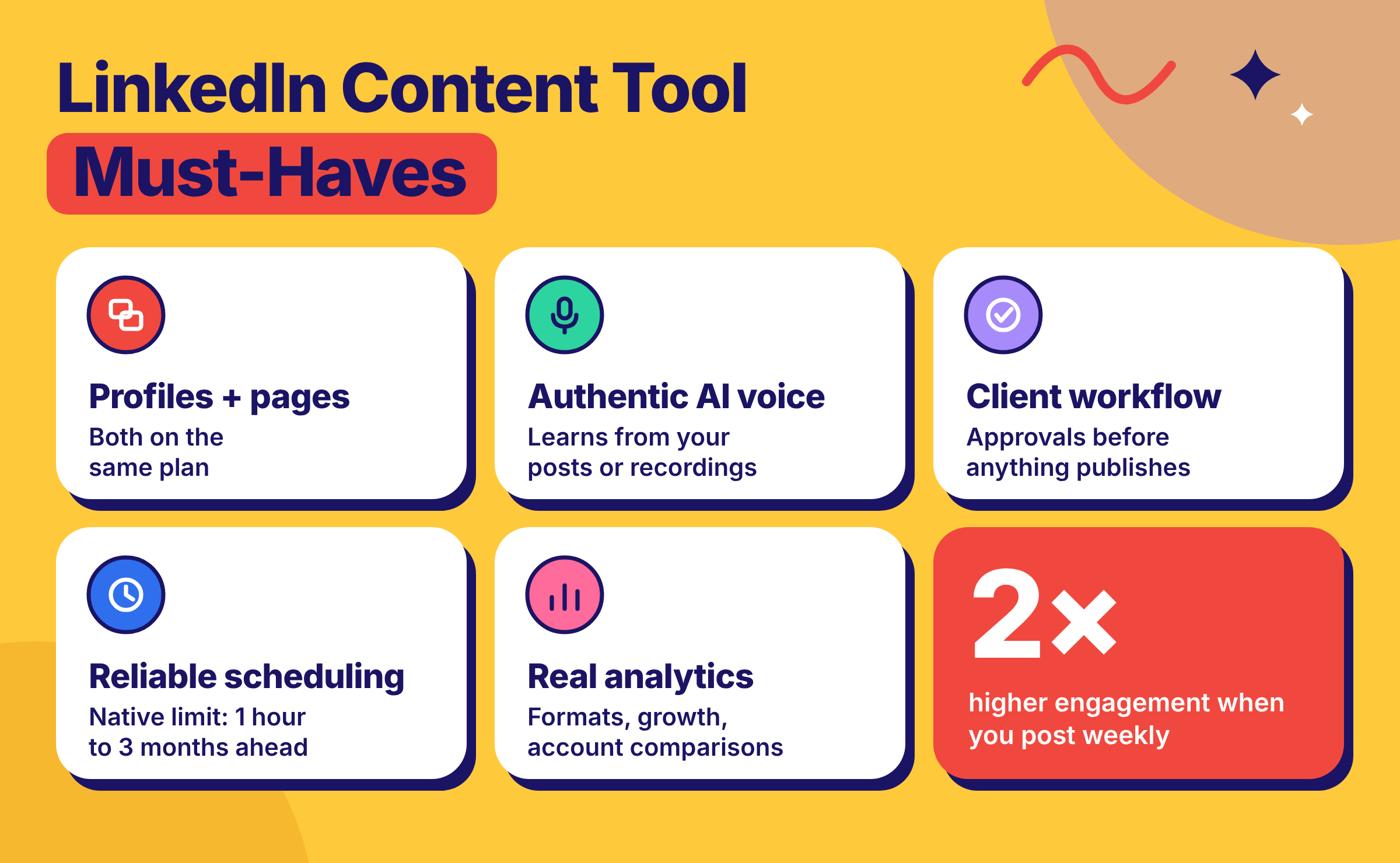
LinkedIn content tool must-have features for creators and businesses in 2026
The minimum viable LinkedIn scheduling tool in 2026 supports both personal profiles and company pages on the same plan, generates content that sounds like the account owner rather than a generic model, and includes some form of client or collaborator workflow. Everything else is a bonus.
Scheduling and Automation: What to Watch Out For
Scheduling reliability is non-negotiable. According to Hootsuite's LinkedIn statistics, companies that post at least once a week see 2x higher engagement — which makes a missed scheduled post a real commercial problem, not just an inconvenience.
2×
Higher engagement for LinkedIn accounts posting at least once per week
LinkedIn's native scheduler does exist, but it has real limits — scheduled times must fall within a 1-hour to 3-month window, and you cannot schedule posts for events or jobs, as noted by Metricool's 2026 scheduling guide. Third-party tools fill the gap — but only if they handle profile-versus-page support properly.
AI Post Generation: Generic Output vs. Authentic Voice
The most common failure mode in AI LinkedIn content generation is tools that produce posts no one would believe came from the person publishing them. Generic openers, interchangeable structures, and no memory of previous tone or phrasing. The best AI LinkedIn content generator tools address this by learning from past posts or, better, capturing voice from recordings directly.
LinkedIn analytics tools built into a platform should report on more than likes and impressions. Best-performing post formats, follower growth by content type, and account-level comparisons are what actually help you adjust strategy.
The 7 Best ContentIn Alternatives for LinkedIn in 2026
1. Hypelio — Best for Agencies and Ghostwriters Managing Multiple LinkedIn Accounts
Hypelio
Hypelio is the strongest pick among ContentIn alternatives for LinkedIn if you manage more than one account. Its multi-account workspace lets you switch between client profiles without ever holding a client's password — each account keeps its own distinct voice, calendar, and analytics.
The standout feature is a story bank: clients speak into a voice note, and Hypelio builds drafts from their actual words and phrases rather than a generic model's output. The difference in authenticity is immediately visible. Drafts then go to clients via a shareable approval link before anything publishes — no email chains, no copy-pasting into Notion.
Pricing is per connected account, billed upfront, which means it costs less than Taplio or Supergrow at scale. It is rated 4.8/5 on G2 and used by teams at Google, Meta, Goldman Sachs, and Accenture. For anyone running LinkedIn as a service, it is the most complete tool in the market.
💡
Pro Tip:Hypelio's one-click client reporting dashboard means you can send a polished monthly report in under two minutes — something ContentIn has no equivalent for.
2. Taplio — Best AI LinkedIn Post Generator for Solo Creators
Taplio is the closest direct competitor to ContentIn for solo personal brand builders. Its AI LinkedIn post generator is capable, the scheduling interface is clean, and it integrates with LinkedIn's API reliably. The main limitation: multi-account support is restricted on the base plan, and there is no structured client approval workflow. If you are one person building one brand, Taplio is a solid ContentIn vs Taplio outcome in favour of Taplio for AI writing depth. If you are a ghostwriter or agency, the ceiling appears quickly.
3. Shield Analytics — Best LinkedIn Analytics Tool for Measuring Content ROI
Shield is the go-to linkedin analytics tools platform for creators who want to understand what is actually working. It tracks post performance over time, surfaces your best-performing formats, and gives account-level data that ContentIn's basic analytics do not approach. Shield does not write or schedule posts — it is an analytics layer you pair with another tool. For creators who already have a scheduler they trust and just need better data, it fills that gap precisely.
4. Supergrow — Best for Quick AI-Assisted LinkedIn Post Creation
Supergrow is fast. If your primary need is an ai linkedin post generator that gets you from idea to draft in under two minutes, it performs well. The templates are plentiful and the interface is minimal. It falls short on scheduling depth, multi-account management, and anything resembling a client content calendar management workflow. Best used as a drafting accelerator alongside a dedicated scheduler.
5. Buffer — Best Free LinkedIn Post Scheduler for Basics
Buffer is the most practical answer to the free linkedin post scheduler question — but with a clear caveat. The free plan supports a limited number of channels, and profile-versus-company-page support depends on which tier you're on. Teams that discover this after onboarding typically end up upgrading faster than expected. For a single personal profile with low posting frequency, Buffer's free tier is genuinely useful. For anything more, it becomes a workaround rather than a solution.
6. AuthoredUp — Best LinkedIn Personal Branding Tool for Formatting
AuthoredUp sits in the LinkedIn personal branding tools category with a focus on post formatting and content history. It is a browser extension that works directly in LinkedIn, giving you formatting controls — bold, italic, special characters — that the native editor lacks. Combined with a draft library and basic scheduling, it is well-suited to creators who care deeply about how their posts look. Limited AI generation and no client workflow, but as a formatting and organisation tool it is one of the best LinkedIn content creation tools for solo creators.
7. Hootsuite / Sprout Social — Best LinkedIn Scheduling Tool for Enterprise Social Teams
Hootsuite and Sprout Social are enterprise-grade LinkedIn post scheduling software platforms built for social media teams managing multiple brands and channels simultaneously. Both support LinkedIn profiles and company pages, include approval workflows, and provide deep analytics. They are priced accordingly — neither is a sensible pick for a solo creator or small ghostwriting agency. If you are part of a marketing team running LinkedIn alongside Instagram, Facebook, and Twitter at scale, they are purpose-built for that multi-channel, multi-account publishing workflow.
Manage every client's LinkedIn account from one workspace
Hypelio handles multi-account publishing, client approvals, and voice-to-post drafting — without shared passwords or email threads.
ContentIn vs. Top Alternatives: Head-to-Head Comparison
ContentIn sits in the middle of the market. More capable than pure schedulers like Buffer, but outclassed by specialised tools the moment your use case extends beyond solo personal branding. The head-to-head across the dimensions that matter most:
Feature
ContentIn
Hypelio
Taplio
Shield
AI writing quality
Good
Voice-native
Strong
None
Multi-account
Limited
✓ per-account pricing
Limited on base
✓
Client approval workflow
None
✓ shareable link
Basic
None
Analytics depth
Basic
Account-level reporting
Moderate
Deepest
Pricing at scale
Expensive
Per-account, cost-effective
Expensive
Mid-range
The most cited reason for switching away from ContentIn is not a single missing feature — it is hitting the multi-account ceiling at exactly the moment your LinkedIn work is growing. By then, migration feels urgent rather than optional.
How to Grow on LinkedIn with Content Tools: Mistakes That Kill Results
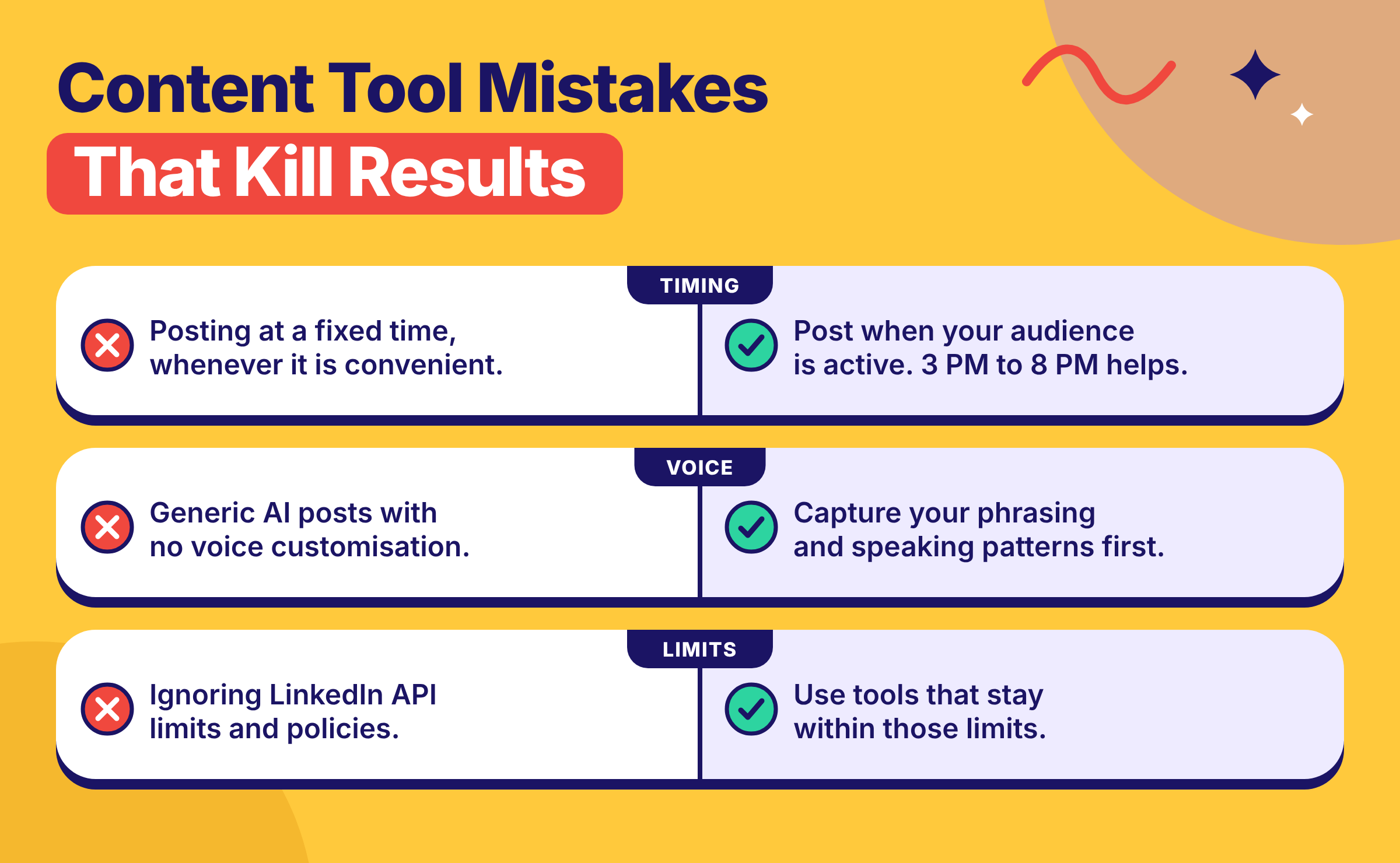
Common LinkedIn content tool mistakes that hurt engagement and content performance
The mistake that consistently limits results on LinkedIn is choosing a tool based on headline AI features without testing two things first: does the free tier cover both personal profiles and company pages, and does the AI output need heavy editing before it sounds like you?
Skipping the audience activity optimisation setting — posting at a fixed time rather than when your specific audience is active wastes distribution. According to Buffer's analysis of 4.8 million LinkedIn posts, afternoon and evening slots from around 3 PM to 8 PM perform notably well — but audience-specific timing always outperforms generic advice.
Using AI-generated posts without voice customisation — posts that sound like every other AI-generated post train your audience to scroll past you. The tools that capture your phrasing and speaking patterns first produce meaningfully different output.
Ignoring social media automation limits — LinkedIn's API has posting limits and usage policies. Tools that work within those boundaries keep accounts safe; tools that push against them create risk. See this guide on LinkedIn automation safety for specifics.
✓ LinkedIn Content Tool Selection Checklist
☐Confirm the plan supports both personal profiles and company pages simultaneously
☐Test the AI output with your actual writing style — does it need heavy editing?
To edit a scheduled post on LinkedIn, navigate to your post composer, click the clock icon to view scheduled posts, select the post you want to change, and choose "Edit" or "Reschedule." You can amend the content, attachments, or timing before the post goes live. Once a post has published, the standard LinkedIn editor applies — you can edit text but cannot add or remove images after publication.
Third-party linkedin scheduling tool platforms like Hypelio and Buffer maintain their own draft queues, so edits made there do not automatically sync back to LinkedIn's native scheduler — always edit in the platform where the post was originally scheduled to avoid duplicate publishing.
🔴
Avoid:Editing a post in both LinkedIn's native scheduler and your third-party tool simultaneously. This is the most reliable way to end up with two versions of the same post publishing at different times.
For formatted posts — special characters, bold text, structural spacing — use a tool like Hypelio's LinkedIn text formatter before scheduling. Formatting applied outside LinkedIn's composer does not always render consistently if edited directly in the native interface afterwards.
Ready to run LinkedIn content that actually sounds like your clients?
Hypelio's voice-to-post drafting, approval workflows, and per-account pricing make it the most practical upgrade from ContentIn for anyone managing more than one profile.
Frequently Asked Questions About ContentIn Alternatives and LinkedIn Tools
Can I automate my LinkedIn posts?
Yes — you can automate LinkedIn post scheduling using third-party tools like Hypelio, Buffer, or Taplio. These platforms work within LinkedIn's API guidelines to schedule and publish posts on your behalf. Fully autonomous engagement automation (auto-liking, auto-commenting at scale) sits in a different risk category — see this guide on what is safe for specifics.
Do scheduled posts get less views on LinkedIn?
No — there is no reliable evidence that scheduling a post via a third-party tool reduces its reach compared to posting manually, provided the tool uses LinkedIn's official API. The more significant factor is timing: posts published when your specific audience is most active consistently outperform posts published at arbitrary times, regardless of how they were sent.
How to schedule LinkedIn posts?
LinkedIn's native scheduler lets you set a post to go live between 1 hour and 3 months ahead — click the clock icon in the post composer. For more control over timing, multi-account management, and content calendar management, third-party tools like Hypelio or Buffer give you a full scheduling dashboard with audience activity optimisation built in.
What are the best alternatives to ContentIn for growing on LinkedIn in 2026?
The best ContentIn alternatives for LinkedIn in 2026 are Hypelio (agencies and ghostwriters), Taplio (solo AI-assisted writing), Shield Analytics (content ROI measurement), Supergrow (fast drafting), and Buffer (free basic scheduling). The right choice depends on whether you are managing one account or many, and whether you need a client approval workflow.
Which LinkedIn tool is better than ContentIn for AI-assisted post writing?
Taplio matches or exceeds ContentIn for pure AI writing depth on a single account. For posts that genuinely sound like a specific person, Hypelio's voice-recording-to-draft system consistently produces more authentic output than either — because it builds drafts from the account owner's own words rather than a generic model.
Is there a cheaper alternative to ContentIn with similar LinkedIn features?
Hypelio's per-account billing makes it cheaper than ContentIn at scale — you pay for exactly the accounts you manage rather than a flat plan with an arbitrary seat limit. Buffer's free tier covers basic scheduling at no cost. For agencies managing five or more accounts, Hypelio's pricing structure almost always comes out lower than ContentIn or Taplio's equivalent tier.
What do ContentIn users switch to and why?
The most common switch destinations are Hypelio (for multi-account management and client workflows), Taplio (for stronger solo AI writing), and Shield Analytics (for deeper performance data). The trigger for switching is almost always hitting a limit: a second client account, a need for structured approvals, or discovering that the ContentIn free tier does not cover company pages reliably.
What consistently separates LinkedIn content operations that scale from those that plateau is not the AI writing model — it is the surrounding infrastructure: how drafts are reviewed, how accounts are separated, and how results are reported. Teams that get the workflow right find the content quality follows. Teams that focus only on the writing tool typically rebuild their stack six months later.
Written by the team behind Hypelio. We publish what we have actually seen work across the accounts we help run — and say so plainly when something did not.
Writing the post is the easy part
The hard part is the next one, and the one after that, still sounding like you. Hypelio drafts in your voice, keeps the queue full, and works the same whether you run one account or twenty.