Hypelio vs Kleo compared for 2026: pricing, AI writing, scheduling, analytics, and agency workflows. Find out which LinkedIn tool fits your use case.
The Hypelio team
November 16, 2026
Hypelio vs Kleo: Which Is Better for LinkedIn?
📅 ⏱ 17 min read📝 ~3300 words
Hypelio and Kleo solve fundamentally different problems — which is exactly why comparing them head-to-head is trickier than it looks. Hypelio is a full-stack LinkedIn content management platform built for agencies, ghostwriters, and founders managing multiple client profiles. Kleo is a Chrome extension that layers templates and formatting tools on top of LinkedIn's native interface. A pattern observed across buyers evaluating both tools is that the right choice becomes obvious the moment they clarify who is managing how many accounts — and what happens when a post needs sign-off before it goes live.
Key Takeaways
Hypelio is built for agencies and ghostwriters managing multiple LinkedIn accounts — story bank, scheduling, approval workflows, and reporting, all in one workspace.
Kleo (now Kleo V3) is a standalone web app at $99/month after its Chrome extension was shut down by LinkedIn in early 2026 — best for solo creators who want coaching and writing templates.
Hypelio starts at $59 for the first five accounts and $9 per additional account — far cheaper at scale than Kleo's flat rate.
Kleo has no native scheduling, no multi-account logic, and no client approval workflow — Hypelio covers all three.
For personal branding on a single account, Kleo is a reasonable tool. For anyone managing two or more LinkedIn profiles, Hypelio is the more capable choice.
Counterintuitive finding: Hypelio's agency model — where clients never share passwords — reduces credential risk compared to most alternatives.
Hypelio vs Kleo at a Glance: What Each Tool Actually Does
The simplest way to frame this comparison: Hypelio replaces your LinkedIn workflow end-to-end, while Kleo adds convenience on top of LinkedIn's existing interface. They are two fundamentally different scopes — which means comparing them on a feature list alone can mislead buyers into the wrong choice.
What Is Hypelio Used for on LinkedIn?
What Is Hypelio Used for on LinkedIn?
Hypelio is a multi-account LinkedIn content management platform. Its core audience is LinkedIn ghostwriting agencies, freelance ghostwriters, and founders who need a consistent presence without personally writing every post. The platform handles the entire workflow: capturing a client's voice through voice recordings (stored in a story bank — a repository of phrases, anecdotes, and ideas pulled directly from the client's words), generating AI drafts that sound like that specific person, routing drafts for client approval, scheduling publication at peak audience times, and reporting results in a format clients can actually read.
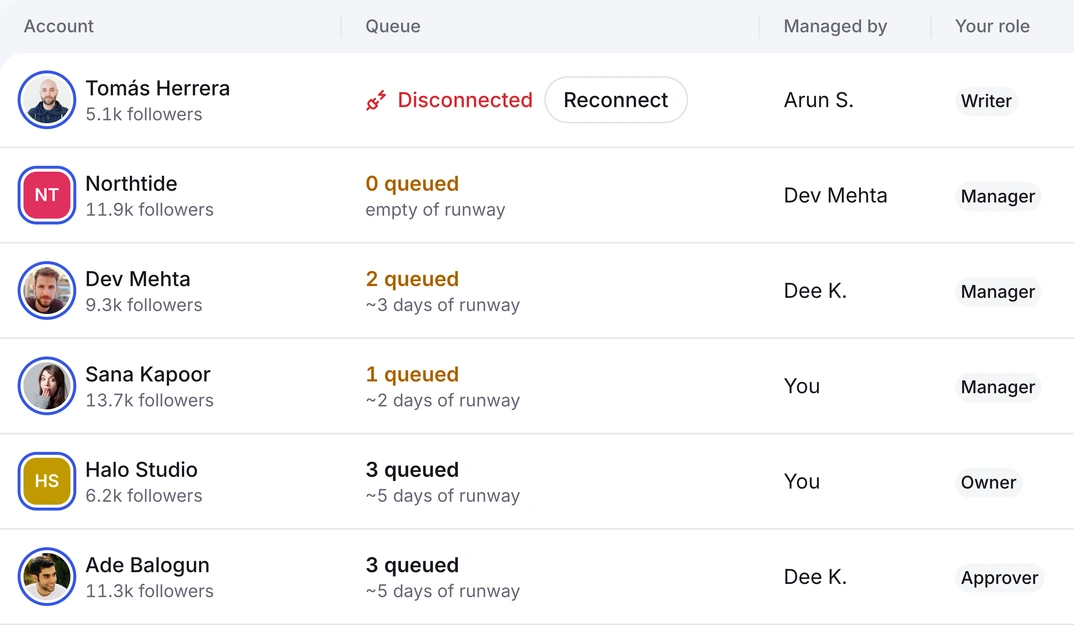
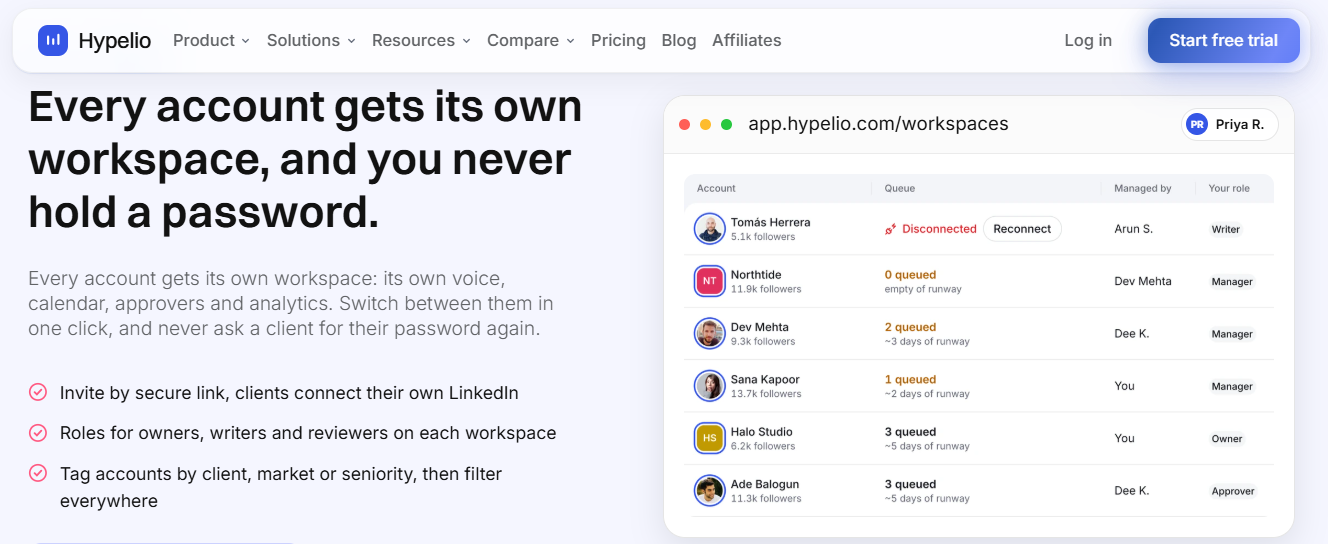
What sets it apart from most LinkedIn tools is what it deliberately avoids. Agencies manage every client account without ever holding client passwords. Each profile maintains its own voice, calendar, and analytics — no cross-contamination between accounts. For anyone running three or more LinkedIn profiles simultaneously, that architecture is not a nice-to-have. It is the entire point.
What Is Kleo and How Does the Kleo LinkedIn Extension Work?
Kleo started as a Chrome extension that layered post templates, formatting tools, and engagement filters directly onto LinkedIn's native interface. In early 2026, however, LinkedIn shut down the Kleo Chrome extension, prompting the team to rebuild as a standalone web app. The current product — Kleo V3 — is a dedicated writing tool at $99/month, with its differentiator being a "second brain" knowledge layer where you feed it context about yourself and it draws on that to generate posts.
Kleo is fastest to start with. There is no onboarding infrastructure, no client setup, and no dashboard to maintain. You write, you post. That simplicity is its genuine strength — and its natural ceiling.
The core difference is not about which tool has more features. It is about whether you are managing one LinkedIn presence or several. That single variable makes the right answer obvious in almost every case.
Feature-by-Feature Comparison: LinkedIn Ghostwriting, Scheduling, and Analytics
Four dimensions matter most to buyers evaluating LinkedIn content tools: AI post generation, scheduling, analytics reporting, and client collaboration. Here is how each tool performs across all four — honestly.
AI LinkedIn post generator: Hypelio's AI LinkedIn post generator is seeded from the story bank — voice recordings, past posts, and brand notes feed directly into the generation process. Drafts sound like the author because they are built from the author's actual words and sentence patterns, not a generic model's defaults. Kleo V3's approach uses a "second brain" knowledge layer where users input context about themselves; it is a step forward from pure prompt templates, but there is no voice-recording input and no persistent per-client architecture. For a solo creator feeding their own context, Kleo's output is solid. For a ghostwriter managing five client accounts simultaneously, the absence of per-profile voice memory is a real constraint — output consistency degrades the moment you switch clients.
LinkedIn post scheduling: Hypelio's LinkedIn post scheduler optimises publish times per account based on audience activity patterns — not generic best-practice windows, but each profile's own data. Kleo V3 has no native scheduling. Posts are still published manually or paired with a third-party tool. For anyone managing more than one account, that gap adds friction fast.
LinkedIn Analytics Tools: Does Hypelio or Kleo Have Better Reporting?
LinkedIn Analytics Tools
Hypelio's LinkedIn analytics tool produces one-click, client-ready reporting dashboards — designed specifically for the moment an agency needs to show a client what their LinkedIn presence has achieved this month. The report covers reach, engagement, follower growth, and top-performing content in a format non-technical clients understand without explanation.
Kleo's analytics are basic. The tool surfaces engagement data within its interface, but there is no structured reporting output — certainly nothing you would send a paying client. If you are a solo creator reviewing your own numbers, that is fine. If you are billing a client for LinkedIn management, Hypelio's reporting is doing meaningful work that Kleo simply does not attempt.
💡
Pro Tip:If your clients ever ask "what did we get for our money this month?", you need a reporting tool built for that moment. Hypelio's one-click dashboard is specifically designed to answer that question without you having to build a slide deck manually.
LinkedIn Content Approval Process and Client Voice Preservation
LinkedIn Content Approval Process and Client Voice Preservation
Hypelio's LinkedIn content approval process works via a shareable link — a draft is generated, then sent to the client for sign-off before anything publishes. No client needs a Hypelio login. No post goes live without explicit approval. This matters far more than it sounds: the most common complaint ghostwriters receive from clients is that something went live that "didn't sound like me" or "wasn't approved." Hypelio's workflow makes that failure structurally impossible.
Client voice preservation is handled at the story bank level. When a client records a voice note describing a recent project or shares a past post they loved, those words are stored verbatim and used to seed future drafts. The result is drafts that require fewer edits — which is what actually saves time at scale.
Kleo has no equivalent to either feature. It is not a criticism — Kleo was not built for that use case.
Kleo vs Hypelio Pricing: Free, Paid, and What You Actually Get
Pricing is where this comparison gets genuinely interesting — and where the most common buyer mistakes happen.
$99/mo
Kleo V3's current flat monthly price — with no free trial and no multi-account support
According to Exeedin's 2026 Kleo review, Kleo V3 is a single-plan tool at $99/month or $999/year — with no trial period. There is no free tier. The former free Chrome extension no longer exists following the LinkedIn shutdown in early 2026. In practice, you are committing $99 upfront with no ability to test the full product first.
Is Kleo free or paid? As of 2026, Kleo is fully paid — the free extension era is over. This is a significant shift from Kleo's original positioning and changes the value calculation considerably.
Hypelio pricing, per its own published data, starts at $59 for the first five connected accounts and $9 for each additional account after that. This model rewards scale. At one account, Kleo is cheaper. At three or more accounts, Hypelio's per-account rate becomes comparable or better — and it covers scheduling, analytics, approval workflows, and voice capture that Kleo does not include at any price.
⚠️
Warning:Comparing Kleo's price to Hypelio's without accounting for what Hypelio replaces is a common mistake. Hypelio bundles scheduling, analytics reporting, an approval system, and voice capture — tools you would otherwise pay for separately. The all-in cost comparison looks very different once you factor that in.
For free LinkedIn tools and current trial terms on Hypelio, check hypelio.com directly — pricing and trial availability can change, and the specific upfront billing terms are worth confirming before committing.
Which LinkedIn Tool Is Better for Personal Branding vs. Agency Workflows?
The clearest use-case litmus test: how many LinkedIn accounts are you managing, and do any of them require client sign-off? That question alone resolves the comparison for roughly 80% of buyers.
For solo creators building their own personal brand, Kleo V3 offers a focused writing environment with a knowledge layer that retains context about you over time. You write, it assists, you post. No multi-account complexity. The $99/month price is worth scrutinising — especially with no trial — but the product is designed for exactly this workflow.
For LinkedIn ghostwriters, agencies, or founders working with a content team, Hypelio's multi-account LinkedIn management is purpose-built in ways Kleo simply cannot replicate. Each client account has its own voice profile, its own calendar, and its own analytics. The approval workflow means nothing publishes without sign-off. Reporting takes one click instead of a manual export. These are not incremental conveniences — they are the structural requirements for running LinkedIn ghostwriting at any real scale.
Accounts that consistently use a voice-capture workflow — where the client speaks, the tool drafts, and a human edits — produce content that clients rarely push back on. The revision cycle is shorter because the first draft is already closer to the client's natural tone.
Best LinkedIn Content Tools for Creators: Where Each Tool Fits
Among the best LinkedIn content tools for creators, the honest segmentation looks like this:
Solo personal brand builder: Kleo V3 (if comfortable with $99/month and no trial), or Hypelio's LinkedIn engagement tool if you want scheduling and analytics built in.
LinkedIn ghostwriter managing 2–10 clients: Hypelio — the multi-account workspace, voice bank, and approval chain are designed exactly for this.
Agency with 10+ client profiles: Hypelio — the per-account pricing model becomes materially cheaper than alternatives like Taplio or Supergrow at this volume.
Founder with a content team: Hypelio — the team collaboration and analytics reporting tools justify the investment even for a single account at this complexity level.
What consistently separates top-performing LinkedIn ghostwriters from those who plateau is not the quality of their writing alone — it is the efficiency of their review and approval loop. The fewer steps between draft and published post, the more clients a single ghostwriter can serve without quality dropping.
Manage Multiple LinkedIn Accounts Without the Chaos
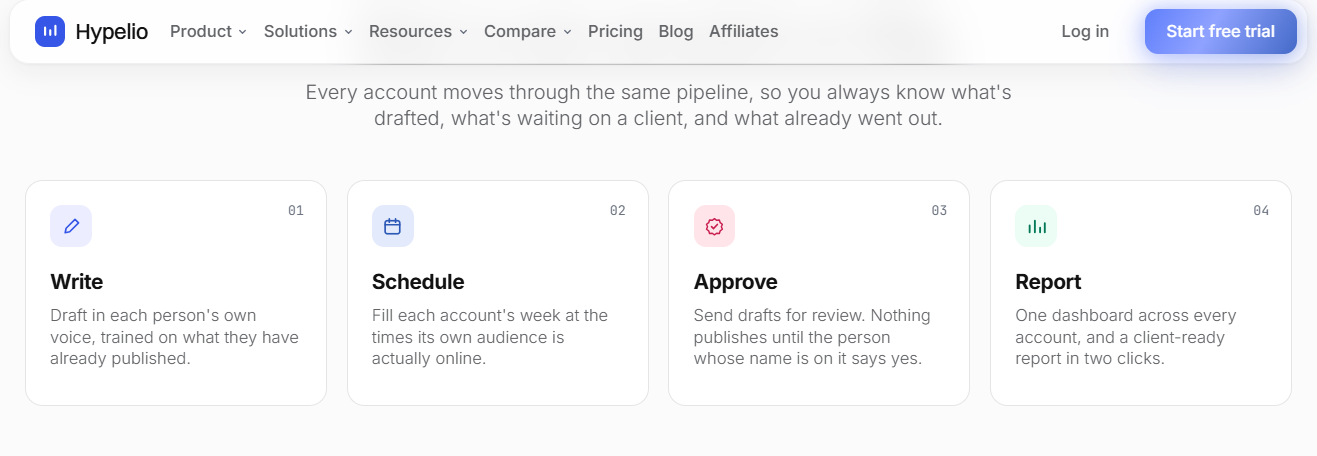
Hypelio handles voice capture, drafting, approval, scheduling, and reporting — all from one workspace, without ever holding client passwords.
Limitations, Risks, and Common Mistakes to Avoid With Both Tools
Every tool has failure modes. The most common mistake with this category of LinkedIn growth tools is treating the AI output as publish-ready. It is not — with either tool.
Kleo's structural limitation: The original extension was shut down by LinkedIn in early 2026, which is itself a signal worth taking seriously. Browser extensions that read LinkedIn data are inherently dependent on LinkedIn's interface remaining stable — and LinkedIn actively discourages them. Kleo V3 moves to a web app model, which reduces this risk, but the platform is still rebuilding trust after the disruption. There is no mobile workflow, no team access, and no history of multi-account support.
Hypelio's main risk: Per-account pricing scales linearly with your client roster. A sudden drop in clients — common in agency work — can leave you over-committed on annual billing. The practical advice: start with slightly fewer accounts than you think you need, then add as the roster stabilises.
Kleo Alternatives for LinkedIn: When to Look Beyond Both Tools
If neither Hypelio nor Kleo fits your specific workflow, the realistic Kleo alternatives for LinkedIn in 2026 include Taplio (broader feature set, $39/month entry point, includes scheduling and analytics), Supergrow, and Shield Analytics for reporting-only needs. Each has a different strength profile. Taplio is the most direct Kleo V3 competitor on features; Hypelio is in a separate category altogether because of the multi-account architecture.
What are the best alternatives to Kleo for LinkedIn? Based on how the market has shifted post-extension shutdown, the strongest alternatives are tools that offer at least scheduling + AI writing in a single product — Taplio for solo creators, Hypelio for anyone with client or multi-account needs.
🔴
Avoid:Publishing AI-generated LinkedIn posts without a human edit pass. Hypelio's story bank reduces generic phrasing, and Kleo's knowledge layer helps with context — but both tools produce drafts, not final copy. Skipping the edit step is the fastest way to erode your personal brand's distinctiveness, regardless of which tool you use.
Hypelio LinkedIn Tool Review: Real Results, User Feedback, and Honest Take
Hypelio holds a 4.8/5 rating on G2 — third-party validation that carries more weight than any vendor-produced case study, particularly for a tool still building its mainstream SEO presence. The rating reflects genuine user satisfaction across agencies, ghostwriters, and enterprise content teams.
Hypelio — By the Numbers
4.8/5
G2 rating
$59
Starting price, first 5 accounts
3–5×
More clients per ghostwriter vs. manual workflows
0
Client passwords held by the agency
The voice-recording-to-draft workflow is the most consistently praised feature in independent reviews. Clients who can speak fluently about their work but struggle to write LinkedIn posts find it removes the blank-page problem entirely — they talk for two minutes, the story bank captures it, and a draft appears that uses their own phrasing. According to Hypelio's internal data, agencies using this workflow report managing 3–5× more LinkedIn clients per ghostwriter compared to fully manual content production.
Honest limitations: Hypelio has a steeper onboarding curve than Kleo. Building a client's story bank, setting up voice capture, and configuring the approval workflow takes real setup time — typically a few hours per new client. The payoff comes in weeks two and three, when draft quality is high and revision cycles are short. Teams that skip the story bank setup typically find themselves producing generic output and spending more time on edits than the tool saves.
The user base includes professionals at Google, Meta, Goldman Sachs, and Accenture — not because those organisations chose Hypelio for brand reasons, but because the platform earns trust in environments where accountability and audit trails matter. That is a meaningful signal for agencies pitching enterprise clients on LinkedIn management.
For a direct comparison of Hypelio's approach to Kleo's, the Hypelio vs Kleo alternative page covers the core workflow differences in detail.
✓ The LinkedIn Ghostwriting Workflow Checklist
☐Set up a separate voice profile / story bank for each client account
☐Collect at least one voice recording or past-post sample before generating any drafts
☐Route every draft through the client approval workflow before scheduling
☐Schedule posts at audience-optimised times — not just "Tuesday 9am"
☐Do a human edit pass on every AI draft before it enters the approval stage
☐Send the client-ready analytics report at the end of each month — not just on request
☐Confirm you are not storing client LinkedIn passwords anywhere in your team's workflow
Ready to Run LinkedIn for Multiple Clients Without the Overhead?
Hypelio is built for exactly this — story bank, approval workflow, scheduling, and reporting, all without holding a single client password.
Frequently Asked Questions About Hypelio vs Kleo for LinkedIn in 2026
What is the difference between Hypelio and Kleo for LinkedIn growth?
Hypelio is a full-stack platform for managing multiple LinkedIn accounts — it covers AI writing, scheduling, client approval, and analytics reporting from one workspace. Kleo V3 is a standalone writing tool focused on content generation for a single account. The core difference is scope: Hypelio replaces your entire LinkedIn workflow; Kleo assists with the writing step only.
Should I use Hypelio or Kleo to grow my LinkedIn audience?
Use Kleo if you manage one account and primarily need writing assistance. Use Hypelio if you manage two or more LinkedIn profiles, need a client approval workflow, or want scheduling and analytics built into the same platform. For solo personal branding with a tight budget, Kleo is simpler. For agency or ghostwriting use cases, Hypelio is the stronger choice.
Is Kleo free to use on LinkedIn?
No — as of 2026, Kleo is a paid-only product. The free Chrome extension was shut down by LinkedIn in early 2026. Kleo V3 costs $99/month or $999/year with no free trial. The original free-tier positioning no longer applies. If you are looking for free LinkedIn tools, Hypelio's free tools page lists available options.
What features does Hypelio have that Kleo does not?
Hypelio includes multi-account management, a voice-recording story bank for client voice preservation, a link-based client approval workflow, audience-optimised LinkedIn post scheduling, and a one-click client-ready analytics dashboard. Kleo V3 covers none of these. Hypelio also does not require agencies to hold client passwords — a meaningful security advantage for professional ghostwriting operations.
Is Kleo or Hypelio better for LinkedIn content creators in 2026?
Kleo V3 is better suited for individual creators writing their own content — the knowledge layer retains personal context and the tool is focused on the writing task. Hypelio is better for creators who have outgrown solo workflows: founders with a content team, ghostwriters with multiple clients, or agencies managing LinkedIn presence at scale. The right answer depends entirely on account count and workflow complexity.
How does each tool handle data privacy and content ownership?
Hypelio's agency model means client LinkedIn credentials are never shared with or stored by the managing agency — a structural privacy advantage. Content drafts and voice recordings stay within the platform workspace. Kleo V3 operates as a web app where you input your own context data. Neither tool publishes a detailed data ownership policy publicly — review the current terms on each platform before committing to either.
What specific results have users achieved with Hypelio?
Hypelio holds a 4.8/5 rating on G2, with independent reviews consistently highlighting the voice-to-draft workflow as the standout feature. Agencies report managing 3–5× more LinkedIn clients per ghostwriter compared to fully manual production workflows. The platform is used by professionals at Google, Meta, Goldman Sachs, and Accenture, suggesting it performs well under enterprise accountability requirements.
Written by the team behind Hypelio. We publish what we have actually seen work across the accounts we help run — and say so plainly when something did not.
Writing the post is the easy part
The hard part is the next one, and the one after that, still sounding like you. Hypelio drafts in your voice, keeps the queue full, and works the same whether you run one account or twenty.