Hypelio vs PowerIn compared: features, pricing, LinkedIn account safety, and AI comment quality. Find out which LinkedIn automation tool fits your workflow in 2026.
The Hypelio team
November 20, 2026
Hypelio vs PowerIn: Which Is Better for LinkedIn?
📅 ⏱ 15 min read📝 ~3000 words
The comparison of Hypelio vs PowerIn is genuinely tricky — not because the tools are similar, but because they are solving entirely different problems. Hypelio is a LinkedIn post generator and content management platform built around publishing original, voice-authentic content at scale. PowerIn is a LinkedIn auto comment tool designed to put your name on other people's posts through automated commenting. A pattern observed across hundreds of LinkedIn creator accounts is that professionals who buy the wrong tool for their workflow end up with neither growth nor safety — just a subscription they quietly stop using.
Key Takeaways
Different tools, different jobs: Hypelio is for creating and publishing content; PowerIn is for auto-commenting on others' posts — they are complements, not direct substitutes.
Safety gap is real: PowerIn's auto-commenting sits in a LinkedIn Terms of Service grey zone with documented account restriction cases; Hypelio operates closer to how Buffer or Hootsuite work.
Pricing logic differs: Hypelio is priced per connected account and includes content creation, scheduling, approval, and analytics — PowerIn covers only the engagement layer.
Who wins for agencies and ghostwriters: Hypelio, by a clear margin — multi-account management, voice capture, and client approval workflows are purpose-built for that use case.
Who wins for solo sales visibility: PowerIn is faster to initial visibility spikes, but carries account risk and comment fatigue from audiences who spot AI-generated replies.
The most counterintuitive finding: Hypelio and PowerIn can coexist — but PowerIn alone, without strong original content behind it, tends to produce shallow engagement that doesn't compound.
What Is Hypelio and What Is PowerIn? (Quick Overview)
What Is Hypelio and What Is PowerIn? (Quick Overview)
These two tools share a category label — "LinkedIn automation" — but that label obscures more than it explains. The difference in what they actually do matters enormously when choosing between them.
What Is PowerIn Used for on LinkedIn?
PowerIn is a LinkedIn engagement automation tool — software that monitors keyword-triggered posts and automatically leaves AI-generated comments on them without requiring you to be online. The core logic: by consistently appearing in the comments of high-visibility posts in your niche, you gain follower exposure and algorithm signals that LinkedIn interprets as active participation. It is a LinkedIn commenting automation software aimed primarily at salespeople, recruiters, and solo creators who want passive presence amplification.
What PowerIn does not do: write or publish original posts, manage multiple client accounts, or give a human any sign-off in the loop before a comment goes live.
What Is Hypelio and How Does It Work?
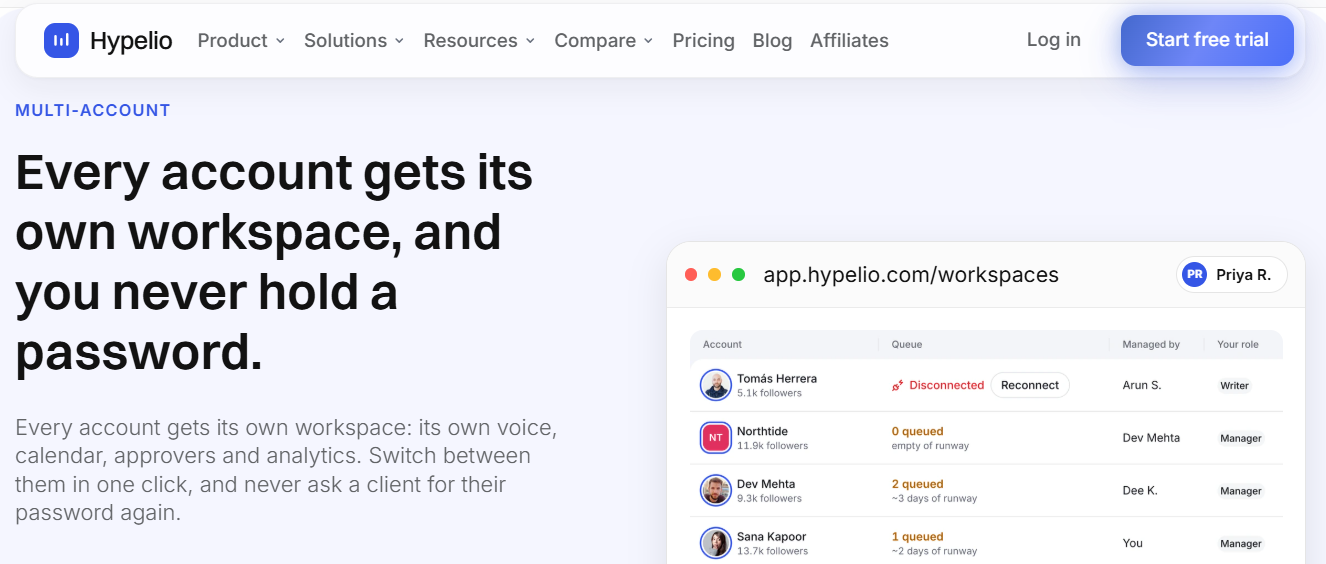
Hypelio is a LinkedIn content management platform built around one insight: AI-generated LinkedIn posts fail when they sound like AI. Its story bank feature — which captures voice recordings verbatim and builds drafts from the creator's own language — is the mechanism that solves this. Beyond the voice capture, Hypelio handles multi-account LinkedIn management under a single login (without storing client passwords), a client approval workflow where drafts go out for sign-off via link, a LinkedIn post scheduler timed to each account's audience activity, and a one-click reporting dashboard.
The most common misconception in head-to-head comparisons is treating these two as substitutes. They are not. Hypelio is a content pipeline. PowerIn is a visibility hack. Understanding that distinction is the entire decision.
💡
Pro Tip:If you need both original content and engagement amplification, consider using Hypelio for publishing and a lower-risk manual engagement strategy — rather than layering PowerIn's autonomous commenting on top of an already active account.
Feature-by-Feature Comparison: Hypelio vs PowerIn in 2026
Hypelio
Side-by-side, the feature gap becomes structural rather than incremental. The two platforms share almost no overlap in what they actually build.
Where Hypelio Wins
Teams that manage multiple LinkedIn accounts consistently find that Hypelio's workspace model eliminates the biggest operational headache: switching between browser profiles or holding client credentials. Each connected account keeps its own voice profile, content calendar, and LinkedIn analytics — none bleed into each other. For ghostwriters, the client approval workflow is the standout feature: a draft link goes to the client, they approve or comment, nothing publishes until sign-off. This keeps the professional relationship clean and the client's brand protected.
The linkedin post generator inside Hypelio is also meaningfully different from generic AI writing tools — because it starts from the user's own voice recordings rather than a blank prompt, the output tends to need less editing before it sounds authentic.
Where PowerIn Wins
PowerIn's clear advantage is speed to initial visibility. Setting up keyword streams takes under an hour, and within days, your profile name is appearing in the comment sections of posts your target audience is already reading. For a solo sales rep entering a new niche, this passive presence can generate real inbound connections faster than waiting for original content to build momentum.
It also requires no content creation skills. If writing long-form LinkedIn posts feels like a barrier, PowerIn sidesteps it entirely.
AI Comment Quality Benchmarking: Which Tool Writes Better Comments?
This is the question that most LinkedIn automation tool comparisons quietly skip. PowerIn generates comments using AI — but the output quality varies significantly depending on keyword stream specificity and the complexity of the original post being commented on. Vague keyword streams produce generic comments ("Great insight! Really agree with this perspective.") that experienced LinkedIn readers recognise immediately as automated. Tight, niche-specific streams produce better contextual responses.
The most damaging consequence of low-quality auto-comments isn't the LinkedIn penalty — it's the audience recognising the pattern and associating your name with spam before you've said anything of value.
Hypelio does not generate comments at all — its AI comment quality benchmarking is simply not a relevant metric because it isn't trying to be a LinkedIn engagement tool in that sense. It drives engagement through better original content, which is a structurally different mechanism.
Pricing Compared: PowerIn vs Hypelio Pricing Plans and Value
Pricing Compared: PowerIn vs Hypelio Pricing Plans and Value
Hypelio pricing is structured per connected LinkedIn account, billed upfront. This model becomes increasingly cost-efficient as the number of managed accounts grows — for an agency managing eight or ten profiles, the per-account rate works out cheaper than per-seat SaaS alternatives like Taplio or Supergrow. According to Hypelio's platform data, the tool is rated 4.8/5 on G2 and used by professionals at Google, Meta, Goldman Sachs, and Accenture — which signals enterprise-grade reliability at a price point designed for scale.
4.8/5
Hypelio's G2 rating — among the highest for LinkedIn content management platforms
PowerIn pricing is tiered by comment volume and monitored keyword streams. Entry-level plans are affordable for a single account with moderate commenting activity. The cost climbs sharply when scaling to multiple profiles or higher daily comment limits — and critically, PowerIn's price buys only the engagement automation layer. You would still need a separate tool for content creation, scheduling, and analytics. That hidden cost is what makes direct price comparisons between the two misleading.
⚠️
Warning:A LinkedIn engagement tool free trial is available on some plans for both tools — but trial terms change frequently. Verify current trial availability directly on each platform's pricing page before making a decision based on this article.
What is the difference between Hypelio and PowerIn in pure value terms? Hypelio's price buys a complete content operation. PowerIn's price buys one tactic. For anyone building a sustainable LinkedIn presence, the all-in-one model tends to deliver better return over a 6–12 month window.
Manage LinkedIn for clients without the credential risk
Hypelio's multi-account workspace lets you run every client profile from one dashboard — with approval workflows built in.
LinkedIn Account Safety: Does PowerIn Get You Banned? Is Hypelio Safe?
LinkedIn's Terms of Service explicitly prohibit third-party tools that simulate user behaviour — and autonomous commenting sits squarely in that category. This is the most searched and least honestly answered question in the LinkedIn growth automation tools space.
Can You Automate LinkedIn Comments Without Getting Banned?
The honest answer: it depends on volume, pattern recognition, and LinkedIn's enforcement priority at any given time. Users running PowerIn at high comment volumes — particularly when comments are repetitive in structure or posted across dozens of posts per day — have reported temporary account restrictions, mandatory CAPTCHA verification, and in documented cases, permanent suspensions. These are not edge cases. They represent a genuine, recurring risk pattern across the LinkedIn commenting automation software category.
What partially mitigates the risk: keeping comment volume low, ensuring keyword streams are specific enough to produce contextually varied output, and pausing automation during LinkedIn's known enforcement windows (typically following platform updates).
🔴
Avoid:Running PowerIn or any LinkedIn auto comment tool at maximum volume on a primary account you cannot afford to lose. The risk-to-reward ratio tilts negative at scale — especially for accounts with significant follower counts or active sales pipelines.
Hypelio's LinkedIn account safety profile is structurally different. It functions as a content scheduling and management layer — similar to how Buffer or Hootsuite work for other platforms — rather than autonomously mimicking user behaviour. Any third-party LinkedIn integration carries some Terms of Service exposure, but the client approval workflow and human-in-the-loop publishing model place Hypelio firmly at the lower end of the risk spectrum. For anyone asking "which LinkedIn automation tool is safest to use", Hypelio's architecture gives a clearer answer.
Who Should Use Each Tool? Use Cases, Onboarding, and LinkedIn Growth Outcomes
After seeing this across both individual creator accounts and agency-managed profiles, the pattern is consistent: the tool that fits your workflow beats the tool with the longer feature list every time.
Is Hypelio Worth It for LinkedIn Growth?
For LinkedIn ghostwriters, agencies, and founders who post consistently, Hypelio is worth it — specifically because it solves the three problems that matter most to them:
AI-generated posts that actually sound like the author (not generic GPT output)
Multi-account LinkedIn management without credential sharing or browser profile juggling
Client approval workflows that protect the ghostwriter-client relationship
The onboarding for Hypelio's voice capture takes a few sessions to calibrate a strong voice profile. Creators who skip this step typically find the AI output reverts to generic phrasing — which defeats the core value proposition. Once calibrated, the story bank compounds: every voice note or recording makes the next draft sharper.
Hypelio's LinkedIn engagement tool approach works through original content that attracts inbound engagement — slower to build momentum than auto-commenting, but the results compound rather than plateau.
Is PowerIn Worth It for LinkedIn Growth?
PowerIn delivers faster early visibility. That is real. For a solo professional who wants to appear in front of a niche audience without committing to a weekly content calendar, keyword-triggered commenting produces measurable profile visits and connection requests within the first few weeks.
What it does not deliver reliably: sustained engagement rate growth, authentic audience relationships, or comment-driven conversions at the rates its positioning implies. The most common failure mode is comment fatigue — where target audiences in a specific niche start recognising the automated pattern and either ignore or mute the account. This typically manifests 60–90 days into consistent PowerIn use in a niche community.
Is PowerIn worth it for LinkedIn growth in 2026? For short-term visibility testing or early-stage brand presence in a new niche, potentially yes. As a long-term LinkedIn growth strategy, the risk-adjusted return is questionable — especially given LinkedIn's increasingly active enforcement of automation policies.
What separates top-performing LinkedIn accounts from accounts with impressive follower counts is not comment volume — it is a consistent body of original content that gives people a reason to follow, trust, and engage without being prompted.
✓ LinkedIn Automation Safety Checklist
☐Keep automated comment volume below 20 per day across any single account
☐Use specific, niche keyword streams — not broad terms that produce generic output
☐Review AI-generated comments weekly to catch repetitive phrasing patterns before LinkedIn does
☐Never automate commenting on a primary revenue-generating account without a risk mitigation plan
☐Pair any engagement automation with a consistent original content schedule to avoid a hollow profile
☐Use human-approved, scheduled publishing (Hypelio model) for client accounts — never autonomous commenting
Alternatives: Hypelio Alternative, PowerIn Alternative, and ReplyGuy vs PowerIn
The LinkedIn growth automation software market has consolidated into two distinct categories — and understanding which category you need clarifies the alternatives landscape immediately.
ReplyGuy vs PowerIn is a common comparison because both target keyword-driven comment automation. ReplyGuy operates across multiple platforms (not just LinkedIn), and its AI comment output has historically been more contextually varied than PowerIn's default output — making it slightly harder for audiences to identify as automated. Pricing is broadly comparable at the entry tier, though PowerIn offers more LinkedIn-specific targeting options. Neither is a risk-free choice for autonomous commenting on LinkedIn.
Other PowerIn alternatives for LinkedIn worth noting:
Reepl — focused specifically on LinkedIn engagement automation with a similar keyword-stream model; positioned as a PowerIn alternative with tighter safety controls
Taplio — hybrid tool covering content creation and some engagement features, though it carries a higher per-seat price that makes it expensive for agencies
MeetAlfred — broader LinkedIn outreach automation including DMs and connection requests; higher risk profile than comment-only tools
For Hypelio alternatives, Taplio and Supergrow compete on content creation and scheduling. Neither replicates Hypelio's story bank / voice-capture mechanism or its agency-grade ghostwriter client approval workflow. For anyone managing LinkedIn for clients professionally, the absence of those features in alternatives is a meaningful gap — not a cosmetic one.
hypelio.com
Write LinkedIn posts that sound like you
Draft in your voice, schedule, and report. One account, or twenty. Priced per account, published up front.
What consistently separates durable LinkedIn growth from short-term visibility spikes is not which tool you choose — it is whether the tool produces content that gives people a reason to follow you back to your profile. LinkedIn growth automation tools in the engagement-only category drive impressions; content pipeline tools drive followers. For most creators in 2026, followers compound. Impressions do not.
Ready to build LinkedIn content that actually sounds like you?
Hypelio's voice-capture story bank and client approval workflow are built for creators and agencies who can't afford generic AI output.
Frequently Asked Questions About Hypelio vs PowerIn for LinkedIn in 2026
Which is better for LinkedIn growth — Hypelio or PowerIn?
Hypelio is better for sustainable LinkedIn growth; PowerIn is faster for early visibility. Hypelio builds a compounding content asset — original posts that attract followers, trust, and inbound leads over time. PowerIn generates comment-based impressions that plateau quickly and carry account-restriction risk. For long-term growth, Hypelio wins by a clear margin.
What are the main differences between Hypelio and PowerIn for LinkedIn?
Hypelio is a content creation, scheduling, and multi-account management platform; PowerIn is a LinkedIn auto comment tool that places AI-generated comments on targeted posts without manual effort. Hypelio requires a human in the publishing loop; PowerIn operates autonomously. They serve fundamentally different workflows and are not direct substitutes.
Is it safe to use LinkedIn automation tools like PowerIn or Hypelio?
Hypelio carries a lower risk profile because it functions as a scheduling layer — similar to Buffer — rather than simulating autonomous user behaviour. PowerIn's auto-commenting sits in a LinkedIn Terms of Service grey zone with documented cases of account restrictions and bans. No third-party LinkedIn integration is entirely risk-free, but the gap between the two tools' safety profiles is significant.
Which LinkedIn comment automation tool has better AI quality?
PowerIn produces contextually adequate comments when keyword streams are specific, but generic output is common with broad targeting — experienced LinkedIn readers recognise the pattern. Hypelio does not generate comments; it generates original posts from the creator's voice recordings, which consistently produce more authentic output than prompt-based AI tools.
How much does PowerIn cost compared to Hypelio, and which offers better value?
PowerIn is priced by comment volume and keyword streams per account; costs scale quickly with multiple profiles. Hypelio is priced per connected account and includes content creation, scheduling, approval workflows, and analytics — making it more cost-efficient at scale. For agencies managing five or more accounts, Hypelio's all-in pricing typically delivers better total value than PowerIn plus the additional tools you would need alongside it.
Is there a LinkedIn engagement tool free trial for Hypelio or PowerIn?
Trial availability varies and both platforms adjust their terms regularly. Verify current free trial options directly on each tool's pricing page — this article's information may not reflect the most current offer. As of early 2026, Hypelio has offered trial access for new accounts; PowerIn has historically offered limited trial tiers for new users.
Which LinkedIn automation tool is best for creators?
Hypelio is the strongest choice for content creators. Its voice-capture story bank solves the core problem most creators face with AI tools — output that sounds generic. The scheduling, analytics, and approval workflow mean creators spend less time on logistics and more time on the voice recordings and ideas that make their content distinctive. PowerIn adds no value to the content creation process.
Written by the team behind Hypelio. We publish what we have actually seen work across the accounts we help run — and say so plainly when something did not.
Writing the post is the easy part
The hard part is the next one, and the one after that, still sounding like you. Hypelio drafts in your voice, keeps the queue full, and works the same whether you run one account or twenty.



 hypelio.com