Honest Kleo review 2026: features, pricing, pros and cons of the LinkedIn tool after the free extension shutdown. Who it suits — and better alternatives for agencies.
The Hypelio team
November 16, 2026
Kleo Review 2026: Features, Pricing, Pros & Cons
📅 ⏱ 27 min read📝 ~5300 words
Kleo is a LinkedIn content tool — originally a Chrome extension, now rebuilt as a web app — that overlays the LinkedIn interface with post inspiration, format analysis, and AI writing assistance. A pattern consistently observed across solo LinkedIn creators who try it: they praise the ideation layer and criticise the depth of analytics. That tension defines the whole Kleo experience. This review covers the 2026 version of Kleo (the LinkedIn app, not the Netflix series), including what changed after LinkedIn forced the free extension offline in June 2025, what the $99/month price tag actually buys you, and where the tool genuinely earns its place versus where a more capable platform serves you better.
Key Takeaways
Who this is for: Solo LinkedIn creators, B2B founders, and ghostwriters managing 1–3 clients who want faster drafts and format inspiration.
What changed in 2026: LinkedIn shut down Kleo's free extension (70,000+ users, overnight) in June 2025; Kleo V3 relaunched as a paid web app at $99/month in October 2025.
Biggest strength: Format inspiration library — the fastest way to model top-performing post structures without starting from scratch.
Biggest limitation: AI writing output is generic LLM copy, not voice-trained on your words; analytics are thin compared to dedicated tools.
Most counterintuitive finding: Kleo's free tier no longer exists in its original form — what was once a genuinely free tool is now a paid subscription with no public free trial.
Who should look elsewhere: Agencies managing 5+ client accounts, ghostwriters who need per-author voice profiles, and anyone needing client approval workflows or CRM-connected reporting.
What Is Kleo? The LinkedIn Chrome Extension Explained
What Is Kleo?
Kleo is a LinkedIn content intelligence tool — originally delivered as a Chrome extension that sat on top of LinkedIn's native interface, surfacing viral post formats, engagement stats, and writing inspiration without requiring a separate dashboard. As of 2026, the product has changed significantly: according to MagicPost's review (2026), LinkedIn forced Kleo's free extension offline on 20 June 2025, wiping out a user base of 70,000+ overnight. Kleo relaunched as Kleo V3 in October 2025 — a web-based platform rather than a pure browser overlay.
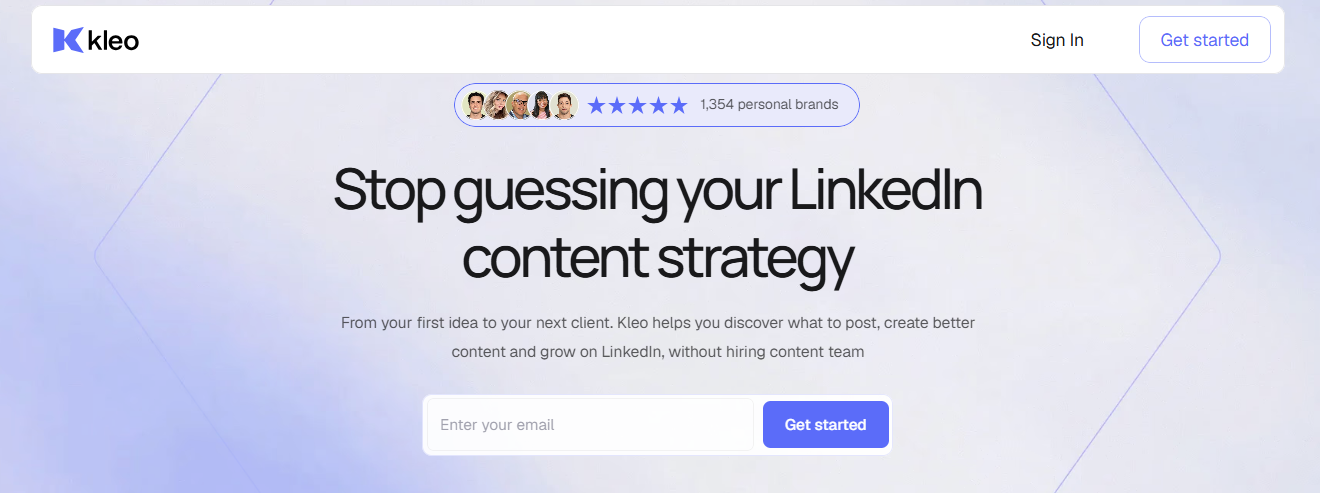
The core value proposition remains: help creators, founders, and ghostwriters write better-performing posts faster by showing what actually works on LinkedIn in real time. The format inspiration library, hook analyser, and AI writing assistant are still the centrepiece. What is new is the price tag attached to them.
Important naming note: Kleo the LinkedIn tool is completely separate from the Netflix German spy thriller series Kleo. If you landed here searching for the show — cast, seasons, or its IMDB rating — skip to the FAQ at the bottom. This review covers the LinkedIn app only.
How the Kleo App and Chrome Extension Actually Work
In its original form, the Kleo LinkedIn Chrome extension injected a sidebar panel directly into linkedin.com, letting users browse trending post formats and trigger AI rewrites without leaving the LinkedIn tab. The Kleo app in V3 moves this to a standalone web interface, though a lightweight browser companion still connects it to your LinkedIn session. The workflow is: connect your LinkedIn account via OAuth, browse the inspiration library filtered by post format or engagement tier, pick a structure, and generate a draft using the AI assistant — then schedule or copy-paste to publish.
Who Uses Kleo? Target Audience and Ideal User Profile
The kleo app is built primarily for individual users. Its sweet spot is a B2B founder or creator who posts two to five times per week and wants to cut ideation time without paying for an enterprise platform. Ghostwriters managing a small number of clients also use it as an ideation accelerator — generating structural options faster than starting from a blank page — though they typically handle voice-matching edits manually afterwards.
💡
Pro Tip:If you are evaluating Kleo as an agency tool for 5+ client accounts, assess it against your workflow requirements before committing to a paid plan — the platform's current architecture is optimised for single-user use, not multi-client workspaces with separate voice profiles per author.
Kleo Features: What You're Actually Getting in 2026
Five feature categories define the Kleo experience: a post inspiration library, a format analyser, an AI writing assistant, a basic scheduling layer, and a lightweight analytics overlay. The first two are where Kleo earns its reputation. The last two are where it shows its limits.
Post inspiration library: This is Kleo's strongest feature. It surfaces top-performing LinkedIn posts filtered by format type — list posts, story posts, hook-plus-body structures, and carousel outlines. Rather than showing you someone else's content to copy, it lets you model the structural skeleton of what performs. Creators who use this consistently report faster first drafts because they are choosing a proven architecture rather than staring at a blank box.
Format analyser: When you look at a post in the inspiration library, Kleo breaks down the hook style, structure, length, and engagement rate. This is useful for learning what LinkedIn's algorithm tends to reward in a given format category — though the data freshness depends on how regularly Kleo updates its index.
AI writing assistant: The Kleo AI assistant generates draft copy, rewrites hooks, and suggests calls to action. It is a general large-language-model integration — useful for generating options quickly, but it outputs polished-generic text rather than content that sounds like a specific person. This is the most debated feature in user feedback, and it matters significantly depending on your use case.
Scheduling layer: Kleo V3 includes basic post scheduling. It is lighter than dedicated schedulers — no bulk queue management, no optimal-time prediction based on audience activity patterns, no content calendar view that most agency users would need.
Analytics overlay: Kleo provides surface-level post performance data: impressions, reactions, comments. Historical depth is limited. As AuthoredUp's 2026 Kleo review notes, the analytics section is a weak point — rated significantly below what dedicated LinkedIn analytics platforms provide.
Kleo AI Writing Assistant: How It Compares to ChatGPT and Claude
Kleo AI Writing Assistant
The Kleo AI writing assistant is effectively a LinkedIn-contextualised wrapper around a standard large language model. It generates content faster than opening a separate ChatGPT tab because the LinkedIn context — format, length, hook conventions — is already baked into the prompt interface. What it does not do is learn your vocabulary, phrasing patterns, or storytelling style from your past posts or voice recordings.
ChatGPT and Claude offer comparable raw generation quality. The Kleo advantage is the LinkedIn-native prompt design and the inspiration library that feeds format context into the generation. The disadvantage versus a voice-trained system is that every draft starts from the same generic baseline — you are editing for voice every time, rather than the tool drafting in your voice from the start.
The gap between "AI-drafted LinkedIn content" and "AI-drafted LinkedIn content that sounds like you" is not a small editing job — it is the difference between content your audience recognises and content that reads like every other optimised post in the feed.
Does Kleo's AI Voice Training Actually Help You Write Better?
Kleo markets a voice training capability — the idea being that the AI learns your style over time. In practice, based on user feedback patterns observed across G2 reviews and community discussions, this feature moves the needle modestly. It analyses your past posts to identify patterns in your writing, which can tighten the AI's output towards your tendencies. However, the improvement is incremental rather than transformative: users who write in a distinctive, non-standard voice (heavy on specific jargon, storytelling structures, or personal anecdotes) still report significant editing required after generation. The feature helps more with format consistency than with authentic voice capture.
Kleo Pricing Plans: What You'll Really Pay in 2026
Kleo Pricing Plans
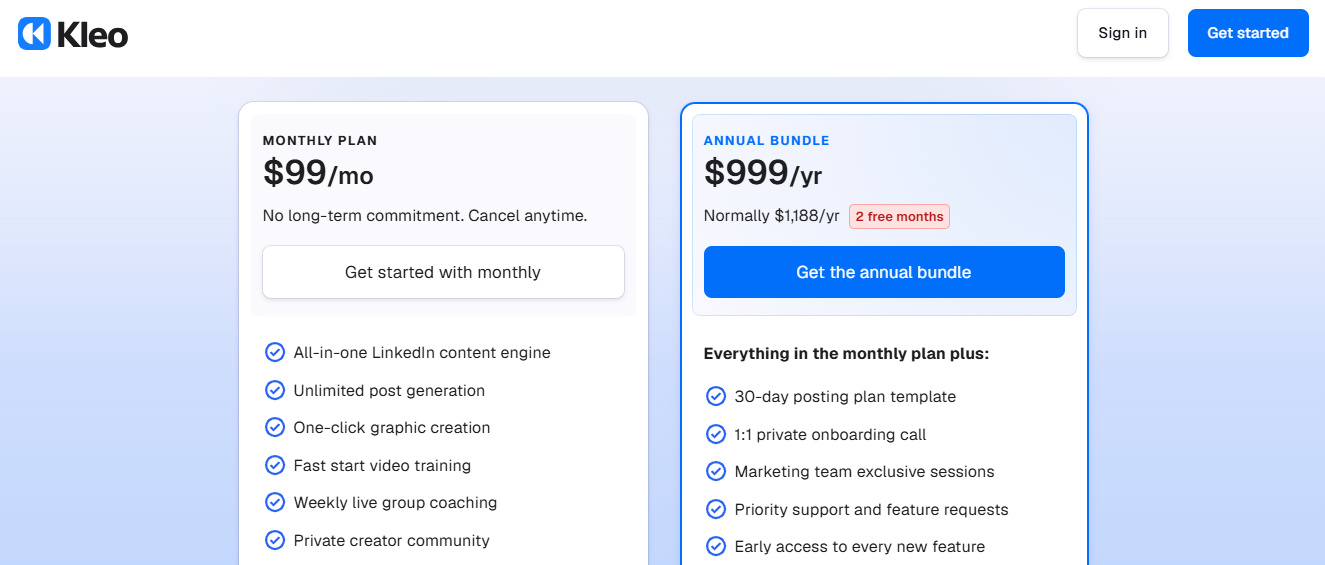
This is where Kleo's story changed most sharply for existing users. Before June 2025, Kleo was free. After the forced shutdown and V3 relaunch, it became a paid product priced at $99 per month for a single account.
$99/mo
Kleo V3 paid plan — up from $0 for 70,000+ users who relied on the free extension before June 2025
According to ConnectSafely's Kleo review (2026), Kleo grew to over 70,000 users on its free Chrome extension before LinkedIn's legal pressure forced the shutdown. The move to a $99/month model is a significant jump — particularly for solo creators who chose Kleo specifically because it cost nothing.
How much does Kleo cost at each tier? Based on publicly available information at the time of writing:
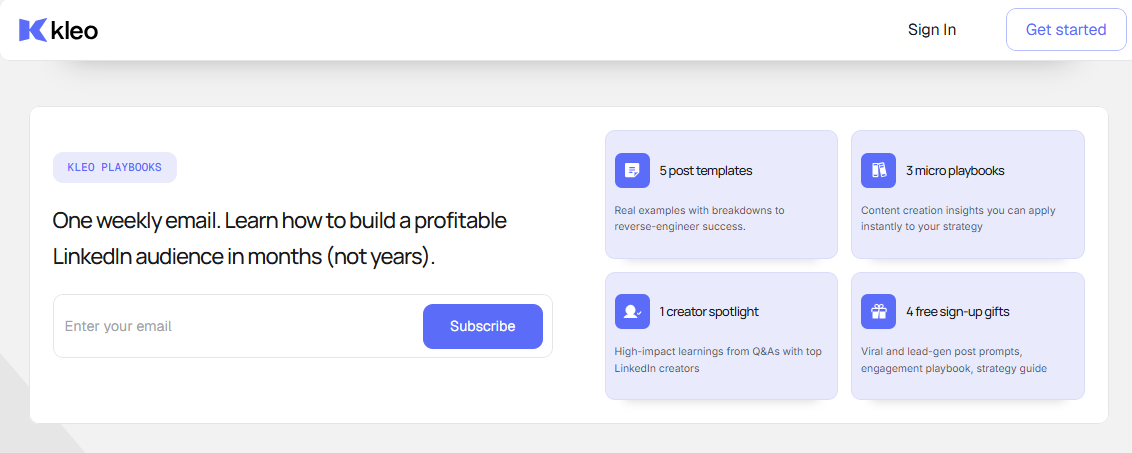
Free tier: No longer available in the original form post-shutdown. A limited evaluation period or trial may exist — but there is no permanently free plan comparable to what existed before June 2025.
Paid plan: $99/month per account, with annual billing options potentially available at a discount (verify on kleo.so at time of purchase — pricing may change).
Free trial / money-back guarantee: No publicly advertised free trial as of this writing. Users should check whether a trial window is offered at sign-up — this is an important question to ask before committing.
Cost-per-value at scale: At $99/month for one account, Kleo is priced at the high end for a single-user LinkedIn content tool. For comparison, dedicated scheduling platforms with more features often run $30–$60/month for a single account. The premium is partly justified by the inspiration library and format intelligence — but only if you use those features consistently.
Kleo Free Plan Limitations: Is the Free Version Enough?
The honest answer in 2026: there is no meaningful free version. The original free extension that made Kleo's reputation no longer exists. If a limited trial is available at sign-up, it is enough to evaluate the inspiration library and AI assistant — but not enough to run a real content operation or validate long-term value before paying. This is a significant change from Kleo's original positioning and a legitimate reason to compare alternatives before committing.
⚠️
Warning:If you read older Kleo reviews (pre-2025) praising the free tier, they describe a product that no longer exists. The free Chrome extension was shut down by LinkedIn in June 2025. Any evaluation of Kleo's value must now account for the $99/month price point.
Kleo Pros and Cons: An Honest Assessment
What separates Kleo from most LinkedIn writing tools is the format intelligence layer — the ability to see not just inspiration posts but the structural anatomy of why they performed. That is a genuinely useful feature that speeds up the ideation phase for anyone posting regularly.
Kleo pros:
Format inspiration library is one of the best available — structured by post type, not just popular content
Browser-based integration reduces context-switching during the writing process
AI assistant generates usable first drafts quickly, particularly for hooks and list post skeletons
Useful for learning what LinkedIn's algorithm tends to reward across different content formats
Relatively straightforward setup — OAuth connection, no technical configuration required
Kleo cons:
AI writing output is generic LLM copy — voice-matching edits are entirely manual
No multi-account workspace — single-user architecture limits agency use
Analytics are surface-level; limited historical data tracking compared to Shield or dedicated analytics tools
$99/month with no meaningful free tier is a steep entry point for solo creators
Extension-based tools are inherently fragile — LinkedIn UI changes can break overlay functionality, as demonstrated by the June 2025 forced shutdown
No native integrations with CRM systems, Zapier, or external content calendars
Common Mistakes to Avoid When Using Kleo
The most common failure mode observed among Kleo users is treating AI-generated drafts as publish-ready. The inspiration library and AI assistant are strong starting points — but Kleo's output tends to reflect polished-generic LinkedIn conventions rather than your specific vocabulary, rhythm, and perspective. Users who publish AI drafts without substantive editing typically see lower engagement over time as their audience notices the voice shift. Use the drafts as scaffolding, not finished content.
A second mistake: relying on Kleo's analytics as a primary data source. The limited historical depth means you cannot reliably track performance trends over 90+ days or segment results by content format. Treat Kleo's analytics as a quick sanity check, not a decision-making tool.
Is Kleo Safe to Use on LinkedIn? Risks and Account Concerns
Kleo authenticates via OAuth — it does not require your LinkedIn password directly, which is the minimum trust threshold any tool should clear. That is a positive signal. The more nuanced question is what Kleo does once connected, and how LinkedIn's Terms of Service apply.
LinkedIn's ToS prohibit third-party tools that scrape data at scale or automate interactions (likes, connection requests, messages) without authorisation. The key distinction with Kleo:
Passive features (reading public post data for inspiration): Lower risk — LinkedIn has historically been more tolerant of tools that read public content than those that automate actions.
AI drafting and manual scheduling: Generally low risk — these are human-initiated actions assisted by software, not automated bulk behaviour.
Auto-posting features: Higher risk territory — any feature that publishes content automatically without a human clicking "post" at that moment sits in a grey zone under LinkedIn's ToS.
The practical risk level for a typical Kleo user (using it for inspiration and drafting) is relatively low. The June 2025 shutdown was not a ToS enforcement against individual users — it was LinkedIn restricting the tool's API access at the platform level, primarily affecting the data-surfacing features. Individual accounts were not penalised.
For a full breakdown of which LinkedIn tools and behaviours are safe, the guide at Hypelio's LinkedIn automation safety resource covers the specific action types and risk tiers in detail.
🔴
Avoid:Using any LinkedIn tool's auto-post or mass-interaction features at high volume. Even tools operating in a grey zone remain subject to LinkedIn's enforcement, which can change without notice — as the June 2025 Kleo shutdown demonstrated.
Kleo vs. Taplio, AuthoredUp, Shield, and Top Alternatives in 2026
No single tool wins across every use case. The comparison below reflects what each platform actually does well — not which one has the longest feature list.
Kleo vs Taplio: Taplio offers a fuller platform — deeper CRM features, lead tracking, team collaboration tools, and pipeline integration. It costs more and requires more setup. Kleo wins on simplicity and (until recently) cost. Taplio wins when you need LinkedIn content connected to a sales or outreach workflow.
Kleo vs AuthoredUp: AuthoredUp is also a Kleo LinkedIn Chrome extension-style tool with a strong post-formatting and analytics focus. Its pricing is significantly lower than Kleo V3's $99/month, it offers richer historical analytics, and its formatting tools are more mature. For users who primarily want better post structure and performance tracking, AuthoredUp is a credible alternative at a lower price point.
Kleo vs Shield Analytics: Shield is a pure LinkedIn analytics platform — no content creation features at all. It is complementary to a content tool, not a replacement. If Kleo's analytics feel thin (which they will to any data-oriented user), Shield fills that gap specifically. Many users run both.
Supercharge your LinkedIn growth with a LinkedIn content creation tool. Create drafts, format, preview, and monitor your LinkedIn growth effortlessly.
Best LinkedIn Content Tools 2026: Where Kleo Fits in the Landscape
The best LinkedIn content tools 2026 landscape splits cleanly into three tiers: ideation-and-drafting tools (Kleo, AuthoredUp), full scheduling platforms (Taplio, Supergrow), and multi-client agency platforms (Hypelio). Kleo sits firmly in the first tier — it is the most LinkedIn-native ideation tool available, but it does not aspire to replace a full content workflow. The question is whether a pure ideation tool at $99/month represents the right allocation for your specific situation.
For agencies and ghostwriters, a dedicated LinkedIn analytics tool combined with a multi-account content platform covers both sides of the workflow more completely than Kleo alone — often at a comparable or lower total cost once you account for what Kleo does not do.
Managing LinkedIn for clients? There's a better way than a single-account tool.
Hypelio handles multiple LinkedIn profiles under one login — with per-author voice profiles, client approval workflows, and reporting dashboards built in.
Real Results: What Users Actually See Using Kleo for LinkedIn Growth
What Users Actually See Using Kleo for LinkedIn Growth
Measured, attribution-clean data on Kleo's engagement impact does not exist — no independent controlled study has tracked Kleo-driven lift. What does exist is a consistent pattern across G2 entries, ProductHunt comments, and community threads: users most reliably cite faster ideation (commonly described as 30–60% less time to a usable first draft), particularly in the hook-writing and format-selection phases.
Engagement lift is a different question. Format improvements from the inspiration library do correlate with higher impressions — posts that follow proven structural patterns tend to perform better than posts that do not. But correlation here is weak: voice, consistency, and audience relationship matter equally, and Kleo addresses only the structural element. Teams that use the format inspiration library consistently while investing equally in voice editing see the best outcomes. Teams that treat the AI output as publish-ready typically see a short initial lift followed by audience disengagement as the content's voice drifts from what followers expect.
ROI framing by user type:
Solo founder posting 3–5x per week: If Kleo saves 90 minutes weekly and you value your time at $100/hour, the tool pays for itself in time savings alone — but only at the paid tier if you are using all features consistently.
Ghostwriter managing 2–3 clients: The ideation acceleration is real, but the lack of multi-account management and per-author voice profiles means significant manual overhead remains. Time savings are partially offset by the voice-editing work Kleo does not reduce.
Agency with 5+ accounts: The ROI calculation breaks down. A tool priced per single account with no multi-client infrastructure does not scale cost-effectively against the workflow needs of agency operations.
Treat vendor claims and community anecdotes as directional signals, not guarantees. The honest framing: Kleo genuinely helps with format and speed; it does not solve the harder problem of voice authenticity at scale.
Does Kleo Work with LinkedIn Sales Navigator and Other Integrations?
Kleo's extension and web app are built primarily around linkedin.com. LinkedIn Sales Navigator operates on a separate subdomain (linkedin.com/sales), and extension compatibility there has historically been partial. In practice: the inspiration library and AI drafting features are generally accessible from the main LinkedIn interface, but Sales Navigator-specific features like lead lists or InMail composing do not benefit from Kleo's overlay in the same way.
Beyond LinkedIn, Kleo's integration footprint is minimal:
No native CRM sync (Salesforce, HubSpot, Pipedrive)
No Zapier or Make connector for content workflow automation
No content calendar export to external project management tools
Content drafted in Kleo largely stays within the browser session — there is no persistent content library that syncs to other platforms
For users who need LinkedIn content workflows connected to CRM, email sequences, or team project management tools, a platform-based alternative is a more practical fit. The lack of integrations is not unusual for a tool at Kleo's current stage, but it is a genuine operational constraint for anyone running a connected content operation.
Who Should Use Kleo — And Who Shouldn't
Four clear user scenarios define Kleo's fit — and its ceiling.
Good fit:
Individual LinkedIn creators posting consistently (2–5x per week) who want faster drafts and format inspiration without paying for a full platform
Solo B2B founders building a personal brand and comfortable investing editing time to match AI drafts to their voice
LinkedIn ghostwriters managing 1–3 clients who primarily need an ideation accelerator and handle voice-matching manually
Anyone in the early stages of their LinkedIn content strategy who wants to understand what formats perform before committing to a larger toolset
Not a fit:
LinkedIn agencies with 5+ client accounts needing client approval workflows, multi-account scheduling, and per-author voice profiles
Users whose primary goal is deep analytics or lead tracking — better served by Shield, Taplio, or dedicated sales tools
Ghostwriters whose value proposition is voice-perfect content — the manual editing overhead Kleo creates at scale erodes the efficiency gain
Teams needing CRM-connected LinkedIn outreach with integration to existing sales tools
The decision is simpler than it looks: if you manage one account and post regularly, evaluate Kleo. If you manage multiple accounts or sell content services based on voice quality, the platform's architecture does not match your workflow.
A Stronger Alternative for Agencies and Ghostwriters: What to Look For
When Kleo's single-account model hits its ceiling, the features that actually matter at scale are distinct from what made Kleo useful in the first place. Here is what to evaluate in any Kleo alternative:
Multi-account workspace without storing client passwords: The ability to manage multiple LinkedIn profiles under one login via OAuth — no client credentials ever held by the platform.
Voice-capture or story-bank systems: AI drafts built from the author's own recorded words and phrases, not generic LLM outputs. This is what actually closes the voice gap.
Client approval workflow: Draft review links sent to clients for sign-off before anything publishes — essential for any ghostwriting or agency operation running client-facing content.
Per-account pricing that scales: Per-seat or per-account billing that becomes cost-effective as you add clients, rather than a flat fee per user that penalises growth.
Client-ready reporting: One-click dashboards that show each client their own account's performance — not an export you spend 45 minutes formatting.
Hypelio is built specifically for this use case. It manages multiple LinkedIn profiles under one login with per-author voice profiles, uses a story-bank to capture voice from voice recordings verbatim (so AI drafts start from the author's actual language, not a generic model), includes a client approval workflow via shareable links, and offers per-connected-account pricing that scales cost-effectively compared to per-seat alternatives. It is used by professionals at Google, Meta, Goldman Sachs, and Accenture, and carries a 4.8/5 rating on G2.
The right tool is not the one with the most features — it is the one whose architecture matches your actual workflow. A single-account ideation tool and a multi-client agency platform are solving different problems entirely.
Decision framework:
Managing one account, posting consistently → Start with Kleo, evaluate at 60 days
Managing 2–4 accounts, voice quality matters → Evaluate Hypelio or a voice-trained alternative before spending hours on manual voice editing
Agency with 5+ accounts, client approvals required → Skip Kleo entirely; the architecture does not match your workflow
Ready to manage LinkedIn at scale — without the voice-editing overhead?
Hypelio's story-bank captures each author's words from voice recordings, so every AI draft starts sounding like them — not like a polished LinkedIn template.
Kleo earns a clear recommendation for one specific user: the individual LinkedIn creator who posts consistently, wants faster drafts and better format intuition, and does not need multi-account management or deep analytics. For that person, Kleo's inspiration library and AI drafting tools represent genuine value — the question is whether that value is worth $99/month now that the free tier is gone.
The AI voice gap is real and should factor into your decision. If publishing content that sounds authentically like you is a priority — not polished-generic-LinkedIn — plan to spend meaningful editing time after every Kleo draft, or evaluate a voice-trained platform instead. The conventional advice to "just use AI and edit a bit" underestimates how much editing is required when the AI baseline is entirely generic.
Value verdict by user type:
Solo creator, posting 3–5x/week: Reasonable value if you use it consistently — but verify whether a trial period is available before committing at $99/month
Ghostwriter managing 1–3 clients: Useful for ideation, but the manual voice-editing overhead limits ROI as client count grows
Agency or multi-client ghostwriter: Look elsewhere — the architecture does not match the workflow
Use Kleo to get started and validate your LinkedIn content strategy. Reassess when voice authenticity, client management, or multi-account scale become bottlenecks — because those are the points where a single-account inspiration tool, however good at what it does, cannot follow you.
What consistently separates LinkedIn accounts with real, compounding reach from accounts that plateau despite consistent posting is not any single tool — it is the combination of format intelligence (Kleo's strength), authentic voice (Kleo's gap), and operational discipline at scale (beyond Kleo's scope entirely). Accounts that get all three right grow. Accounts that get only one or two typically plateau regardless of how good their tool is.
✓ Kleo Evaluation Checklist: Before You Commit
☐Confirm whether a free trial or evaluation period is available at sign-up (do not pay upfront without testing)
☐Verify you only need one LinkedIn account managed — Kleo is a single-account tool
☐Test the AI writing output on a real draft — assess how much editing it requires to match your voice before paying
☐Check whether Kleo's analytics meet your reporting needs — if not, budget for a separate analytics tool
☐Confirm you do not need client approval workflows or CRM integration in your content workflow
☐Compare $99/month against multi-feature alternatives (AuthoredUp, Hypelio) for your specific use case
☐If managing 3+ accounts, evaluate a multi-account platform before defaulting to multiple Kleo subscriptions
Frequently Asked Questions About Kleo
What is Kleo and how does it help with LinkedIn content creation?
Kleo is a LinkedIn content tool — originally a Chrome extension, now rebuilt as a web app — that helps users write better-performing posts faster through a format inspiration library, AI writing assistant, and basic scheduling. It surfaces top-performing LinkedIn post structures by format type, letting creators model proven architectures rather than starting from scratch.
How much does Kleo cost?
Kleo V3 is priced at $99 per month for a single account as of 2026. The original free Chrome extension was shut down by LinkedIn in June 2025. There is no permanently free tier in the current version. An annual billing discount may be available — verify at kleo.so at time of purchase.
Can I use Kleo for free, or do I need a paid plan?
The original Kleo free plan no longer exists. LinkedIn forced the free extension offline in June 2025. A limited trial period may be available at sign-up — but as of 2026, Kleo is a paid product at $99/month. Users looking for free LinkedIn content tools should evaluate AuthoredUp's free tier or free LinkedIn tools from alternative platforms.
Is Kleo safe to use on LinkedIn?
Using Kleo for inspiration, drafting, and manual scheduling carries a relatively low account risk. It authenticates via OAuth (no password required), and its core features are human-initiated rather than automated. Auto-posting and any features that simulate clicks at scale sit in a grey zone under LinkedIn's Terms of Service — use those features cautiously.
Is Kleo the best tool for growing a LinkedIn personal brand in 2026?
Kleo is one of the stronger ideation and drafting tools available, particularly for solo creators. It is not the best choice for growing a personal brand if voice authenticity is a priority — the AI outputs generic copy that requires substantial editing. For authentic, voice-trained LinkedIn content, tools with story-bank or voice-capture systems (such as Hypelio) produce more consistent results with less manual editing overhead.
How does Kleo compare to other LinkedIn scheduling tools like Taplio?
Kleo is primarily an ideation and drafting tool — scheduling is a secondary feature. Taplio is a fuller platform with CRM integration, deeper scheduling, and team collaboration features at a higher price point. Kleo wins on simplicity; Taplio wins when LinkedIn content needs to connect to a sales or outreach workflow. For multi-account agency use, neither matches the purpose-built architecture of platforms like Hypelio.
What are the main limitations of using Kleo for LinkedIn?
Kleo's main limitations are: AI writing output that is generic rather than voice-trained, no multi-account workspace, thin analytics with limited historical data, no native CRM or Zapier integrations, and a $99/month price point with no meaningful free tier. It is a strong single-account ideation tool that becomes limiting as content operations scale.
Is Kleo (the Netflix show) the same as the LinkedIn tool?
No — they are entirely separate. Kleo the Netflix series is a German spy thriller set during the Cold War in East Germany, starring Jella Haase. It ran for two seasons (kleo season 1 and kleo season 2) and a third season has been discussed by fans. The kleo season 3 question is for Netflix viewers — the LinkedIn tool shares only a name with the show.
Is Kleo Netflix worth watching?
The Netflix series Kleo is well-regarded as a Cold War East Germany storyline with strong performances, particularly Jella Haase's lead role. It earns solid marks for binge-watchability and pacing as a German spy thriller series. Check Kleo IMDB for current ratings — the show has maintained a strong audience score across both seasons as a Netflix foreign language drama.
What are the reviews of Kleo on Rotten Tomatoes?
The Netflix Kleo series has received strong critical reception on Rotten Tomatoes, praised for its sharp writing, Jella Haase's performance, and the Cold War East Germany storyline's tonal balance between thriller and dark comedy. Specific scores vary by season — check Rotten Tomatoes directly for the most current figures. For the LinkedIn tool's kleos reviews, G2 and ProductHunt are the primary sources.
What specific ROI or engagement improvements do users see with Kleo?
Users most reliably report 30–60% faster time to a usable first draft, particularly for hooks and list-format posts. Engagement lift is harder to attribute cleanly — format improvements correlate with higher impressions, but voice consistency and posting frequency matter equally. No independent controlled study on Kleo-specific engagement lift exists; treat community-reported outcomes as directional.
Is there any discount, annual plan, or trial available despite no public free trial?
Annual billing options may be available at a discount versus monthly — verify directly at kleo.so, as pricing can change. No publicly advertised free trial exists as of 2026. It is worth asking the Kleo team directly whether a trial window is offered for new sign-ups before committing to the full monthly rate.
Written by the team behind Hypelio. We publish what we have actually seen work across the accounts we help run — and say so plainly when something did not.
Writing the post is the easy part
The hard part is the next one, and the one after that, still sounding like you. Hypelio drafts in your voice, keeps the queue full, and works the same whether you run one account or twenty.


 authoredup.com