Honest Postwise review 2026 covering features, pricing plans, pros and cons, and how it compares to Taplio, Supergrow, and Hypelio for Twitter and LinkedIn.
Postwise is an AI-powered social media writing and scheduling tool built primarily for Twitter/X growth, with LinkedIn added later as a secondary channel. A pattern observed across hundreds of creator accounts is that Postwise works well as a speed layer — getting drafted posts out faster — but consistently underdelivers for anyone who needs analytics, voice consistency, or multi-author management. The core loop is simple: input a topic, receive an AI draft, edit, schedule. Whether that loop justifies the cost is where the debate actually lives.
Key Takeaways
Who this is for: Solo creators and founders posting primarily on Twitter/X who want faster drafting and Auto Plug automation.
What you'll learn: Exactly what each Postwise plan includes, where the pricing page contradicts the homepage, and how the tool compares head-to-head with Taplio, Supergrow, and Hypelio.
The Auto Plug advantage: No competing tool at this price point replicates it — and it genuinely drives follower-to-lead conversions when configured correctly.
The critical gap: Postwise offers no analytics at any pricing tier — not even basic engagement tracking — which makes ROI reporting impossible.
Most counterintuitive finding: The 4.5-star rating you see in Google search results draws from reviews that are 18–24 months old; more recent community sentiment runs closer to 3.5 stars for LinkedIn-primary users.
Bottom line: Postwise is worth it for Twitter/X-first creators. It is not worth it if LinkedIn is your primary or only channel.
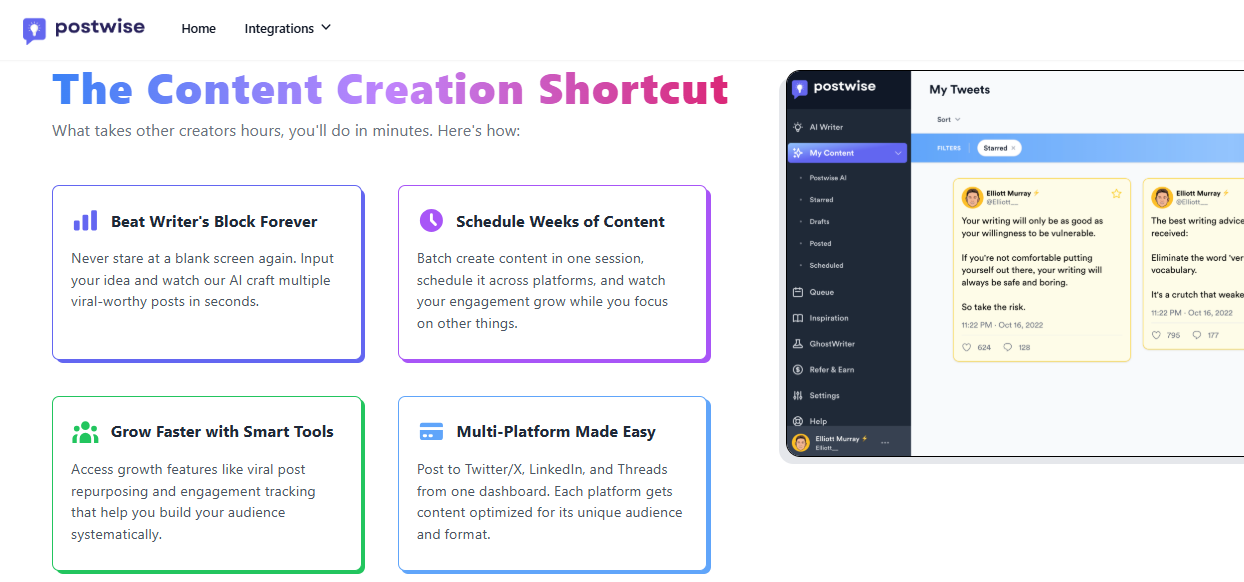
Postwise is an AI writing and scheduling platform that started as a Twitter/X ghost-writer and later expanded to include LinkedIn. Its Twitter-first DNA still shapes every product decision — the hook library, the viral post templates, and the Auto Plug automation are all calibrated to how Twitter/X content performs, not LinkedIn's native narrative format.
The core loop is fast and low-friction. You input a topic or paste in a hook, the AI generates a draft in seconds, you edit, and you schedule. That positions Postwise as a speed layer — a way to maintain posting frequency without staring at a blank editor — rather than a full content strategy or analytics platform.
Unlike LinkedIn-first tools, Postwise is built for creators who post across multiple networks. That cross-platform breadth is both its strength and its trade-off. The strength: one dashboard for Twitter/X and LinkedIn. The trade-off: neither channel gets the full depth it would from a purpose-built tool.
⚠️
Warning:The most repeated user frustration isn't about features — it's about not knowing what Postwise actually costs and what each plan truly includes before committing. That trust gap has never been fully addressed by the product team.
How Postwise Uses AI to Generate Social Media Content
How Postwise Uses AI to Generate Social Media Content
Postwise uses a large language model trained on high-performing Twitter/X posts to generate drafts from a topic prompt, a hook, or a URL. The AI surfaces hook options first — typically three to five variations — and then expands the selected hook into a full post. Users can iterate by regenerating or editing inline.
The model performs well on short-form Twitter content. On longer LinkedIn posts, AI writing quality degrades noticeably — drafts tend to inherit Twitter-style line breaks, punchy one-liners, and hooks that read as abrupt rather than authoritative in a LinkedIn feed. The tool does not adapt to individual voice over time; every draft starts from the same base model regardless of your previous posts.
Postwise Features Breakdown: What You Actually Get
Five functional pillars define what Postwise actually does day-to-day:
AI tweet and post writer — draft generation from topic prompts, with hook variations
Viral hook library — a curated bank of high-performing opening lines, filterable by niche
Auto Plug — automated replies triggered when a post hits engagement thresholds
Content calendar — a basic scheduling view across Twitter/X and LinkedIn
Cross-platform scheduling — publish to Twitter/X and LinkedIn from a single queue
What is notably absent: engagement analytics, audience growth tracking, performance benchmarking, client approval workflows, multi-account team permissions, and voice or story capture. These are not minor gaps — for agencies and ghostwriters, they are dealbreakers.
Auto Plug: The One Feature Worth Copying
Auto Plug: The One Feature Worth Copying
Auto Plug is Postwise's standout mechanic. When one of your posts crosses a preset engagement threshold — say, 50 likes — Postwise automatically posts a follow-up reply to that thread, typically a CTA linking to a newsletter, product, or lead magnet. No competing tool at the same price point has replicated this mechanic effectively.
Users who configure Auto Plug correctly report meaningful follower-to-lead conversion lifts. The key word is "correctly" — if the trigger threshold is set too low, the auto-reply fires on every mediocre post and reads as spam. Teams that set the threshold to match only their top-quartile posts see the most consistent results.
💡
Pro Tip:Set your Auto Plug threshold at the 75th percentile of your average post engagement — not your personal best. This ensures the auto-reply fires on consistently strong posts, not flukes, and avoids diluting its impact with low-signal triggers.
Does Postwise Work for LinkedIn — Or Is It Still Twitter-First?
Postwise works for LinkedIn scheduling — posts go out reliably and on time. The limitation is everything around the scheduling. There is no LinkedIn-specific analytics, no engagement tracking, no audience growth graph, and no performance benchmarking at any pricing tier. You can publish to LinkedIn but you cannot measure what happens after.
The AI drafts also require more editing for LinkedIn. Twitter content rewards brevity and punchy hooks. LinkedIn rewards narrative depth, professional context, and a different paragraph rhythm. Postwise drafts land closer to Twitter style regardless of which network you are writing for — which means more editing time for every LinkedIn post.
Postwise is a writing accelerator for Twitter. Using it as a LinkedIn growth platform is like using a road bike on a mountain trail — it technically works, but it was not built for the terrain.
Now that the feature set is clear, the pricing structure is where the real due diligence begins — and where the most confusion lives.
Postwise Pricing Plans: What the $37 Plan Actually Buys You
Postwise Pricing Plans
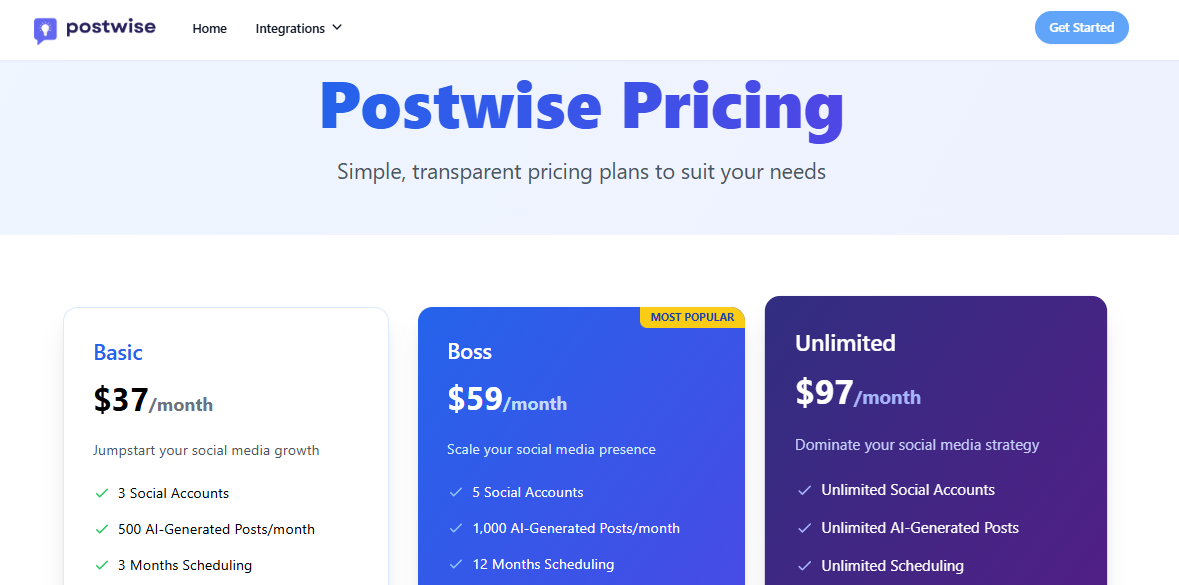
According to a 2026 review of Postwise pricing, the tool runs at $37/month for Basic, $59/month for Boss, and $97/month for Unlimited. That looks straightforward. It is not.
$37/mo
Postwise Basic — but what that actually includes differs between the homepage and the pricing page fine print
The discrepancy between homepage messaging and the pricing page is the single largest complaint thread in Postwise's Reddit and Twitter communities. The homepage implies the Basic plan includes generous AI credits and scheduling capacity. The pricing page fine print restricts the number of scheduled posts, AI generations, and connected accounts per tier — often in ways that are only discovered after signup.
Postwise Pricing Plans Side-by-Side: Basic vs. Growth vs. Enterprise
Plan
Monthly Cost
Best For
Key Limits
Basic
$37
Solo creators starting out
Limited AI credits, restricted scheduled posts/month, 1–2 accounts
Boss
$59
Active creators posting daily
More AI credits, higher post volume, still single-user
Unlimited
$97
Power users, small teams
Uncapped AI, broader scheduling — but still no analytics at any tier
At scale, the cost-per-published-post calculation matters. On the Basic plan, scheduling 60 posts per month works out to roughly $0.62 per post — with no analytics attached. That figure becomes harder to justify as your content operation grows and you have no data to show for it. Annual billing discounts exist but are not prominently surfaced during signup, meaning many users pay monthly rates they did not need to.
🔴
Avoid:Signing up based solely on the homepage plan description. Read the pricing page fine print carefully — specifically the per-tier limits on AI generations and scheduled posts — before entering payment details.
Postwise Pros and Cons: An Honest Assessment
The 4.5-star aggregate rating visible in Google search results draws from reviews that are 18–24 months old. The product has changed, and more recent community sentiment on Reddit and Product Hunt skews closer to 3.5 stars for LinkedIn-primary users. That gap between legacy social proof and current user experience is itself a signal worth noting.
Postwise pros:
Genuinely fast AI drafting — from topic to schedulable post in under two minutes
Auto Plug is a unique and effective conversion mechanic, unavailable at this price elsewhere
Clean UI with a low learning curve — setup takes under 30 minutes
Twitter/X growth focus is well-executed for solo creators in the 1,000–50,000 follower range
Postwise cons:
AI writing quality degrades on longer LinkedIn posts and does not adapt to individual voice over time
No analytics suite at any pricing tier — no engagement tracking, no audience growth graph
Pricing transparency issues create friction before purchase
No client approval workflow, no multi-account team permissions — agencies cannot safely use it
Limitations and Risks Worth Knowing Before You Buy
What are the limitations of Postwise? The core limitations cluster into three areas: analytics, voice, and team infrastructure. There is no way to track post performance inside Postwise — you will need a separate tool for that. The AI produces one-size-fits-all drafts; ghost-written voice consistency is not a feature the platform addresses at all. And there is no way to manage multiple authors, send drafts for client approval, or separate client workspaces.
Creators who skip a parallel-testing step — running the same prompt through Postwise and an alternative like Taplio before committing — typically find themselves locked into a tool that partially fits their workflow and switching six months later at cost.
Postwise vs. Taplio, Supergrow, and Hypelio: Head-to-Head Comparison
The most useful framing for this comparison is by primary use case, not by feature count. Feature lists are easy to pad. What matters is which tool fits which job.
Comparison Table: Postwise vs. Taplio vs. Supergrow vs. Hypelio
On AI writing quality for LinkedIn specifically: Taplio and Supergrow both produce drafts that better match LinkedIn's native narrative format out of the box. Postwise drafts require noticeably more editing to remove Twitter-style line breaks and punchy hooks that land awkwardly in a professional feed.
On cost per result at scale: Postwise's pricing is competitive for one or two accounts. Above three profiles, Hypelio's per-connected-account model becomes more cost-effective — and adds client approval workflows and voice consistency features Postwise does not offer at any tier.
The gap that no major review site fills: none publish side-by-side AI output samples from the same prompt run through each tool. That is the single most useful data point creators are asking for and not finding. The practical workaround is to run a parallel draft test yourself — same prompt, same topic — before committing to any platform.
Postwise review 2026. An honest look at the AI writer, Ghostwriter, Auto Plug and the $37 to $97 Postwise pricing, plus who should skip it on LinkedIn.
Best AI Twitter Growth Tools 2026: Where Postwise Fits
Among the best AI Twitter growth tools 2026 has to offer, Postwise sits in a specific niche: fast drafting plus Auto Plug automation for creators in active growth mode on Twitter/X. For pure writing assistance without scheduling, tools like Claude or ChatGPT with a custom prompt often outperform it on raw output quality. For richer analytics alongside AI writing, Hypefury and TweetHunter offer more data. Postwise wins when speed and Auto Plug automation are the primary requirements, and when analytics can live in a separate tool.
Managing LinkedIn for clients or multiple authors?
Hypelio handles the entire workflow — from voice-captured drafts to client approval to scheduling — in one workspace per client, with no password sharing required.
Who Is Postwise Best For — and Who Should Skip It?
What separates Postwise users who get real value from those who churn within 90 days is almost always the same variable: whether Twitter/X is their primary channel.
Postwise is a strong fit for:
Solo creators and founders who post primarily on Twitter/X
Creators in the 1,000–50,000 follower growth phase who need posting consistency
Anyone who wants Auto Plug as a conversion lever without building a custom automation
Users who have a separate analytics tool and just need drafting speed
Postwise is a poor fit for:
LinkedIn-first professionals who need native format support and analytics
Ghostwriters managing multiple client voices — the tool has no voice adaptation or multi-author workspace
Anyone who needs to report content ROI to a stakeholder — there is simply no data to export
The is Postwise worth it question resolves differently depending on your stack. If you are already paying for a social scheduler and need writing assistance as an add-on, Postwise as a drafting layer can make sense at $37/month. If you are consolidating tools into one platform, its analytics gap makes it a partial solution that will force you to maintain a second tool regardless.
Postwise is not worth it if LinkedIn is your only or primary channel. The tool's own marketing now acknowledges this implicitly — Twitter/X success stories dominate its case studies and social proof almost entirely.
Postwise Alternatives in 2026: When to Choose Something Else
Postwise alternatives 2026 worth considering fall into two distinct camps depending on where you post and how complex your content operation is.
If LinkedIn is your primary channel and you're a solo creator: Taplio and Supergrow offer deeper LinkedIn-native features — analytics, carousel builders, and content inspiration feeds calibrated to LinkedIn's algorithm. Both produce drafts in a format closer to LinkedIn's native style without the Twitter-to-LinkedIn translation overhead.
If you're a ghostwriter or agency managing multiple LinkedIn authors:Hypelio is the purpose-built alternative. Its story bank captures client voice from voice recordings verbatim, multi-account workspaces keep client credentials entirely separate, and the client approval link workflow eliminates back-and-forth email chains before every post goes live. For agencies managing three or more LinkedIn profiles, the per-account pricing model also becomes meaningfully more cost-efficient than Postwise's flat-tier structure. Hypelio holds a 4.8/5 rating on G2 and is used by professionals at organisations including Google, Meta, Goldman Sachs, and Accenture — a signal that its workflow handles enterprise-level demands. You can explore its LinkedIn analytics tools and engagement features as part of a free evaluation, and there are also free tools available to test before committing.
If Twitter/X growth is the goal but you want better analytics than Postwise provides: Hypefury and TweetHunter are the natural next steps, both offering richer performance data alongside AI writing assistance.
The mistake most users make when switching tools is choosing an alternative based on a features list rather than testing actual AI output quality on a prompt that matches their own content style. Run a parallel draft test first — it takes ten minutes and prevents a costly six-month commitment to the wrong tool.
✓ Pre-Purchase Evaluation Checklist for Any AI Social Tool
☐Confirm your primary channel (Twitter/X vs. LinkedIn) before shortlisting tools
☐Read the pricing page fine print — not just the homepage plan summary
☐Run the same prompt through two competing tools and compare the raw output
☐Check whether the tool offers analytics — or whether you will need a second platform
☐Verify multi-account support if you manage more than one author or client
☐Confirm whether a client approval workflow exists if you are ghostwriting or running an agency
☐Check review recency — ratings from 2023 may not reflect the current product
LinkedIn-first? There's a better-fit tool.
Hypelio is built specifically for LinkedIn — multi-account workspaces, voice-captured drafts, client approval workflows, and analytics your clients can actually read.
Is Postwise a Good Tool for Growing on Twitter in 2026?
Postwise is a solid choice for Twitter/X growth specifically, particularly for solo creators in active audience-building mode. Its AI drafting speed, viral hook library, and Auto Plug automation are genuinely useful for maintaining posting frequency and converting engaged followers into leads. For Twitter/X, it performs above average. For LinkedIn-only use, it falls short.
How Does Postwise Use AI to Generate Social Media Content?
Postwise uses a large language model trained on high-performing Twitter/X posts to generate drafts from a topic prompt, URL, or hook. The AI produces three to five hook variations first, then expands the selected hook into a full post. Output quality is strongest on short-form Twitter content and weaker on longer LinkedIn posts, where the model tends to default to Twitter-style formatting regardless of target platform.
How Much Does Postwise Cost, and What Does Each Plan Include?
Postwise pricing runs $37/month (Basic), $59/month (Boss), and $97/month (Unlimited). The key caveat: the homepage and pricing page describe plan limits differently. AI credit allowances, scheduled post caps, and connected account limits are more restricted in the pricing page fine print than the homepage implies. Annual billing discounts exist but are not prominently surfaced during signup.
What Are the Limitations of Postwise?
Postwise has no analytics at any pricing tier — no engagement tracking, no audience growth data, no performance benchmarking. Its AI does not adapt to individual voice over time, making ghost-written voice consistency impossible natively. There is no client approval workflow and no multi-account team permissions, which rules it out for agencies and ghostwriters managing multiple authors.
What Is the Difference Between Postwise and Other AI Social Media Schedulers?
Postwise is Twitter/X-first with a unique Auto Plug automation feature no competitor has matched at the same price. Taplio offers deeper LinkedIn analytics. Supergrow focuses on LinkedIn carousels and document posts. Hypelio is purpose-built for agencies and ghostwriters managing multiple LinkedIn authors, with client approval workflows and voice capture that Postwise does not offer at any tier.
Can Postwise Help Me Grow My Audience Without Posting Manually?
Postwise reduces manual posting effort significantly through AI drafting and scheduled publishing, but it is not a fully autonomous growth tool. You still need to review and edit drafts, set Auto Plug thresholds, and manage your content calendar. Auto Plug automates follow-up replies when posts hit engagement targets, which removes one manual step — but the drafting and scheduling still require human input to function well.
Does Postwise Work for LinkedIn?
Postwise schedules to LinkedIn reliably, but its LinkedIn support is shallow. There are no LinkedIn-specific analytics, no engagement tracking, and no native LinkedIn post formats like carousels or documents. AI drafts default to Twitter-style formatting, requiring additional editing for LinkedIn. For LinkedIn-primary users, tools like Taplio, Supergrow, or Hypelio are significantly better fits.
What consistently separates creators who get measurable ROI from their content tools from those who switch platforms every six months is not which tool they choose — it is whether they matched the tool to their primary channel before committing, tested actual AI output on their own content style, and checked whether analytics were included or would need a separate subscription. Postwise gets the first part right for Twitter/X. It is the second and third parts where the gaps show.
Written by the team behind Hypelio. We publish what we have actually seen work across the accounts we help run — and say so plainly when something did not.
Writing the post is the easy part
The hard part is the next one, and the one after that, still sounding like you. Hypelio drafts in your voice, keeps the queue full, and works the same whether you run one account or twenty.


 taplio.com