Supergrow Pricing Explained: Plans, Limits & Value
Supergrow pricing starts at $19/mo but the real entry point is $39/mo Pro. Full breakdown of plans, limits, annual savings, and honest value by use case.
The Hypelio team
November 12, 2026
Supergrow Pricing Explained: Plans, Limits & Value
📅 ⏱ 11 min read📝 ~2100 words
Supergrow pricing runs from $19/month (Starter) to $199/month (Teams), with a Pro tier at $39/month sitting in the middle as the most popular option. Annual billing saves roughly 20% across all plans. A pattern observed across LinkedIn content tools is that the headline price rarely tells the full story — what matters is which features are gated behind which tier, and whether those gates match your actual workflow. This breakdown covers every plan, the real usage limits, and an honest verdict on whether Supergrow makes sense for your specific use case.
Key Takeaways
Supergrow has three plans: Starter ($19/mo), Pro ($39/mo), and Teams ($199/mo) — plus a 7-day free trial on every paid plan.
Analytics are locked behind Pro — Starter users get no post performance data, which is a significant gate for anyone serious about growth.
Annual billing takes roughly 20% off: Pro drops to ~$31/month, Teams to ~$159/month.
For solo creators, Pro at $39/month is defensible. For ghostwriters managing multiple clients, the per-account model and lack of a client approval workflow create friction that eats into time savings.
The most common complaint in community threads: users who bought an early lifetime deal feel the current monthly subscription doesn't reflect a commensurate feature upgrade.
Cheaper alternatives exist — but "cheaper" doesn't always mean better value once workflow gaps are factored in.
Supergrow is an AI-powered LinkedIn content tool — software built specifically to help creators, ghostwriters, and B2B professionals draft, schedule, and grow their LinkedIn presence with less manual effort. Unlike general AI writers, its features are designed around LinkedIn's native content formats: text posts, carousels, and an inspiration feed of high-performing content.
Core features across paid plans include an AI writing assistant, post scheduling, carousel creation, and analytics. The AI drafting is trained on LinkedIn-native content patterns, which is Supergrow's main argument over using a general-purpose tool like ChatGPT for the same job.
Who Is Supergrow Built For?
Supergrow's primary audience is solo creators and individual professionals who want to publish consistently on LinkedIn without spending an hour per post. It also targets ghostwriters managing a small number of client accounts and B2B teams wanting a centralised drafting space. Where it starts to strain is at the agency end — managing many profiles simultaneously isn't what the platform was designed to do, and the pricing reflects that.
💡
Pro Tip:Before evaluating any LinkedIn AI tool on price alone, list the three features you'd use daily. If those features are gated to a higher tier, the entry price is effectively irrelevant — the tier you actually need is your real cost.
Supergrow Plans and Features: Every Tier Broken Down for 2026
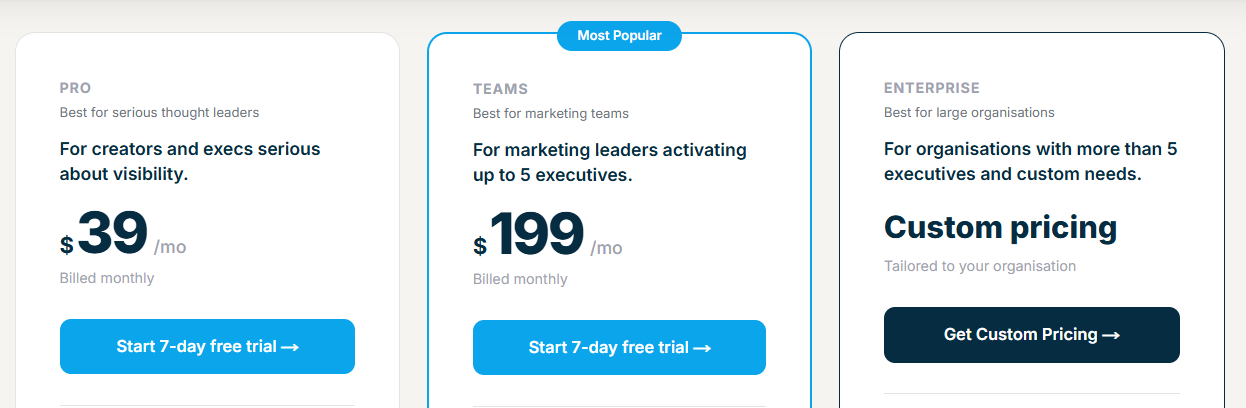
Supergrow currently offers three plans. Here's the complete picture, including where the meaningful feature gates sit:
Supergrow's real entry price for serious use — the Starter plan locks out analytics entirely
Supergrow Monthly vs Annual Pricing: Exact Savings Per Plan
Annual billing saves approximately 20% across all tiers. In practice: Starter drops from $19 to roughly $16/month, Pro from $39 to ~$31/month, and Teams from $199 to ~$159/month. Over a full year, the Pro annual plan saves around $96 compared to paying monthly — worth taking if you're committed to the platform beyond a trial period.
Does Supergrow Have a Free Trial and Can You Cancel Anytime?
Every paid Supergrow plan includes a 7-day free trial, confirmed across multiple independent sources including Postiv's 2026 alternatives review. The Supergrow free plan limits apply to the Starter tier — capped AI credits and no post performance analytics — making it useful for exploring the interface but insufficient for consistent publishing. Cancellation is available at any time; you retain access until the end of your billing period. No long-term contracts are required on monthly plans.
⚠️
Warning:Supergrow's Starter plan has no analytics whatsoever. If you need to know which posts are performing — and you do — the Starter price is misleading. You're effectively forced into Pro at $39/month the moment you care about results.
Is Supergrow Worth It? Honest Value Assessment by Use Case
Is Supergrow Worth It? Honest Value Assessment by Use Case
The problem isn't the price. It's that the platform is priced for one person doing one thing — and many buyers need it to do more.
Solo creators (3–5 posts/week): The Pro plan at $39/month is defensible. The AI drafting speed realistically saves 3–5 hours monthly for a consistent creator. If your time carries any billable value — even £50/hour — the maths work.
Ghostwriters managing multiple clients: The value equation weakens. Supergrow's per-account limits and the absence of a client approval workflow mean you're building workarounds. Those workarounds eat into the time savings the tool was supposed to deliver.
B2B brands and teams: At $199/month for five profiles, the per-seat cost is $39.80 per account — identical to paying for five individual Pro subscriptions. The Teams plan doesn't offer meaningful per-seat savings; you're paying for the shared workspace, not for a volume discount.
Common Mistakes When Choosing a Supergrow Plan
Starting on Starter to "save money" — then hitting the analytics wall immediately and upgrading anyway, losing a month of data.
Assuming Teams scales like an agency tool — five accounts is a hard cap, and there's no client-facing approval flow built in.
Comparing Supergrow's price to doing nothing — the right comparison is to what your time is actually worth, or to the alternative tool you'd use instead.
Managing LinkedIn for more than one person?
Hypelio is built for ghostwriters and agencies — per-account pricing, voice-capture drafting, and a client approval workflow included. No shared passwords, no workarounds.
Supergrow vs Taplio and Other Alternatives: Pricing and Feature Comparison
Teams that consistently outperform on LinkedIn rarely use just one tool for years without re-evaluating — the market has shifted enough in 2025–2026 that the best choice a year ago may no longer be the best choice now.
On pure AI writing and post inspiration, Supergrow is competitively priced. On team collaboration and multi-account management, the gaps become visible quickly. According to Supergrow's own comparison page, Supergrow charges per programme (five accounts on Teams), whereas Taplio charges per individual account — so for small rosters, Supergrow may be cheaper; for larger ones, the maths invert.
ClickGrow AI pricing (sometimes searched as "clickgrow ai pricing") positions it as a lower-cost entry point with comparable AI drafting features. It's worth evaluating if budget is the primary constraint and you don't need analytics or carousel tools.
Best LinkedIn AI Writing Tool Pricing: What You're Actually Comparing
The most common mistake when comparing best LinkedIn AI writing tool pricing is treating AI writing quality as the only variable. What actually differentiates tools at the £30–100/month price point is scheduling depth, analytics access, multi-account handling, and whether a client workflow exists. AI drafting quality has converged enough across tools that it's rarely the deciding factor. Check the analytics capabilities and engagement features of any tool you're evaluating — these are where real workflow differences live.
🔴
Avoid:Choosing a LinkedIn content tool based on the monthly price of its lowest tier. The tier you'll actually use is almost always one step up — and that's the number that matters for your budget calculation.
✓ Supergrow Plan Selection Checklist
☐Confirm how many LinkedIn profiles you need connected — if more than 1, Starter and Pro are out
☐Decide whether post analytics are essential — if yes, skip Starter entirely
☐Check whether you need a client approval step before posts go live — Supergrow doesn't have one built in
☐Compare annual vs monthly: if you'll use it for 6+ months, annual billing saves ~$96/year on Pro
☐Use the 7-day trial to test AI drafting quality against your actual writing voice — not sample prompts
☐If managing more than 3 clients, evaluate whether a purpose-built multi-account tool is a better structural fit
Need a Supergrow alternative built for client work?
Hypelio gives ghostwriters and agencies per-account pricing, voice-capture story banks, and password-free multi-profile management — rated 4.8/5 on G2 by teams at Google, Goldman Sachs, and Accenture. Explore free tools first if you want to try before committing.
Frequently Asked Questions About Supergrow Pricing
How much does Supergrow cost per month in 2026?
Supergrow's Pro plan costs $39/month on a monthly basis ($31/month billed annually). The Starter plan is $19/month ($16/month annually), and Teams costs $199/month ($159/month annually). The Pro plan is the effective entry point for anyone who needs analytics, confirmed by multiple 2026 independent reviews.
What are the usage limits on Supergrow's free plan?
Supergrow's Starter plan (its lowest paid tier at $19/month) caps AI-generated posts per month and excludes post analytics entirely. There is a 7-day free trial on paid plans, but no permanently free tier with unlimited access. If you need to track post performance, the Starter plan is not viable regardless of price.
Which Supergrow plan is best for solo creators?
Pro at $39/month is the right plan for solo creators. It unlocks analytics, removes the AI credit cap, and includes carousel creation. Starter is only worth considering for a short evaluation period. Annual billing brings Pro to ~$31/month — the better choice if you're committing beyond two months.
Is Supergrow a good value compared to writing LinkedIn posts manually?
For consistent creators, yes — the AI drafting can save 3–5 hours monthly, making $39/month easily justified if your time has any billable value. The caveat: you need to actually use the tool consistently. Creators who post fewer than twice per week rarely see enough output volume to feel the time saving.
What AI features does Supergrow include across its plans?
Supergrow's AI features include post drafting (trained on LinkedIn-native content patterns), a PostCast voice-to-post tool (gated to higher tiers), carousel generation, and an inspiration feed. AI credit limits apply on Starter; Pro and Teams users get higher or unlimited credits. The scheduling intelligence is separate from AI writing credits.
Can you cancel a Supergrow subscription anytime?
Yes — Supergrow subscriptions can be cancelled at any time on monthly plans, with access continuing until the end of your paid billing period. Annual plans are paid upfront; refund terms for annual cancellations mid-cycle are not explicitly published, so confirm directly with support before committing to an annual plan.
How does Supergrow compare in price and features to Taplio?
Supergrow's Pro plan ($39/month) is cheaper than Taplio's entry pricing ($65–99/month). Taplio includes deeper CRM-style engagement tracking and DM automation that Supergrow doesn't match. For pure LinkedIn AI writing tool cost, Supergrow wins on price. For engagement analytics and outreach, Taplio has more depth — at a materially higher cost.
What consistently separates LinkedIn content tools that deliver genuine ROI from those that feel expensive after three months is not the AI writing quality — that's converged across the market. It's whether the tool fits your actual workflow: how many accounts you manage, whether clients need to approve content, and whether the analytics give you enough signal to improve. Supergrow pricing is fair for what it does. The question is whether what it does is what you actually need.
Written by the team behind Hypelio. We publish what we have actually seen work across the accounts we help run — and say so plainly when something did not.
Writing the post is the easy part
The hard part is the next one, and the one after that, still sounding like you. Hypelio drafts in your voice, keeps the queue full, and works the same whether you run one account or twenty.