Compare the 7 best Taplio alternatives for LinkedIn in 2026 — ranked by AI writing quality, scheduling reliability, and true cost for creators, ghostwriters, and agencies.
The Hypelio team
November 10, 2026
7 Best Taplio Alternatives for LinkedIn in 2026
📅 ⏱ 26 min read📝 ~5200 words
A pattern observed consistently across LinkedIn creator communities is this: people don't leave Taplio because it's bad — they leave because they're paying for a full platform when they only use two or three features. Taplio alternatives range from free Chrome extensions to full agency platforms, and the right one depends entirely on whether you need AI writing, scheduling, analytics, or multi-account management — rarely all four at once. This guide cuts through the noise with a budget-segmented comparison of the seven most credible options, benchmarked on AI output quality, scheduling reliability, and true monthly cost — not just the advertised starting price.
Key Takeaways
Who this is for: Solo creators, solopreneurs, ghostwriters, and agencies managing LinkedIn — anyone evaluating whether Taplio is worth the cost in 2026.
What you'll learn: How seven tools compare on AI writing quality, scheduling reliability, analytics depth, and real pricing — segmented by budget and use case.
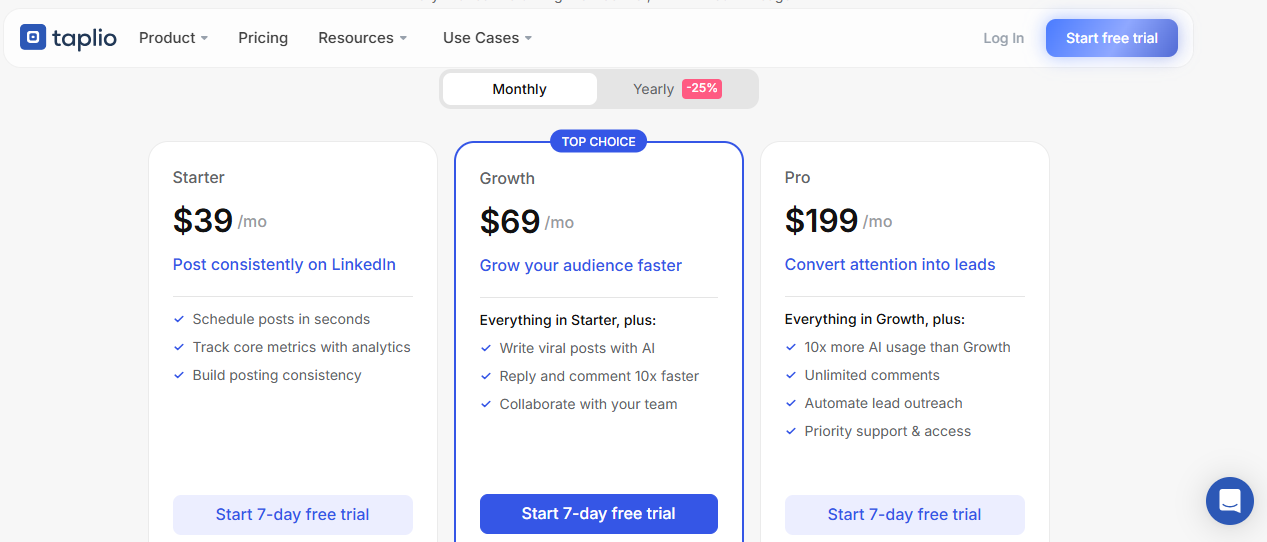
The price reality: According to Postiv (2026), Taplio's AI plan starts at $69/month — not the $39 often cited — making price comparison more important than ever.
Best for agencies/ghostwriters:Hypelio — the only tool here with voice-capture, client approval workflows, and password-free multi-account management.
Best free option: Kleo (Chrome extension) for inspiration and formatting at zero cost.
Counterintuitive finding: Users who switched from Taplio purely for price, without matching the tool to their actual workflow, typically switched again within 90 days — costing more overall.
Typical time before a price-only switch leads to a second switch
£0
Cost of Kleo — the best free formatting alternative
What Is Taplio and Why Are People Looking for Alternatives in 2026?
What Is Taplio and Why Are People Looking for Alternatives in 2026?
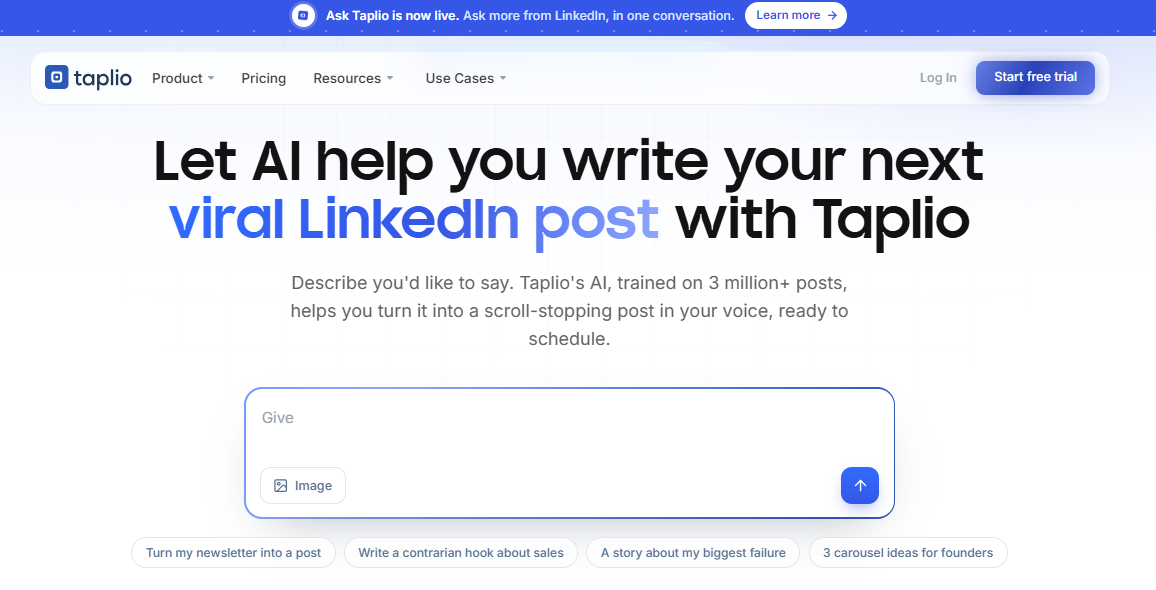
Taplio linkedin is an AI-powered LinkedIn growth platform that combines post generation, a content inspiration feed, scheduling, basic CRM features, and a Chrome extension under one subscription. On paper, it covers everything. In practice, most users end up paying for the full package when their real workflow only touches AI writing and scheduling — and that gap is where the pricing frustration begins.
According to Postiv (2026), Taplio's AI plan starts at $69/month — a figure that surprises many users who saw the lower entry-level price advertised elsewhere. That $69 is the tier where the AI writing features actually become useful. This means the tool's perceived value is often evaluated against the wrong price point.
Taplio Pricing Breakdown: Why It Feels Expensive
Taplio Pricing Breakdown
The pricing confusion is structural. Taplio offers a lower entry tier that restricts AI-generated post volume and limits the scheduling and CRM features most users came for. To get the full experience — the one reviewed across comparison articles — you're on the $69+/month plan. For a solo creator posting three times a week, that's a significant monthly commitment for features they may only partially use.
Starter tier: Limited AI post generation, restricted scheduling volume, no advanced analytics
Standard tier (~$69/month): Full AI writing, scheduling, CRM-lite, and Chrome extension features
Multi-account support: Restricted on lower tiers; agencies need higher tiers or separate accounts
LinkedIn analytics depth: Basic by comparison to dedicated tools like Shield Analytics
The most common complaint isn't that Taplio is bad — it's that the pricing doesn't scale sensibly for edge cases: a ghostwriter managing five clients, a solopreneur who only needs scheduling, or a creator whose primary need is authentic-sounding AI output rather than a CRM.
Is Taplio Worth It in 2026?
Taplio remains a solid all-in-one tool for individual LinkedIn creators who want everything in one place and are comfortable paying $69/month for that convenience. It falls short for three specific profiles: agencies managing multiple client accounts (multi-account access is not designed for this), users who want deep LinkedIn analytics (the analytics tab is surface-level), and anyone whose primary frustration is AI-generated posts that sound generic. For those three groups, the alternatives below are a better fit — and often significantly cheaper.
⚠️
Warning:Some Taplio Chrome extension alternatives use LinkedIn automation methods that fall outside LinkedIn's Terms of Service. Any tool that requires your LinkedIn password or simulates automated engagement at scale risks account restriction. Always check whether a tool connects via LinkedIn's official OAuth before entering credentials.
How We Evaluated These Taplio Alternatives
Every tool in this list was assessed against five criteria that actually matter in a real LinkedIn workflow — not just feature checklists.
AI writing quality and voice preservation: Does the output sound like a person, or does it read as templated AI prose? We ran the same set of topic prompts through each tool to compare draft quality.
LinkedIn content scheduling reliability: Consistent, on-time publishing matters more than clever features. Tools with reported scheduling delays or posting failures during peak hours were penalised.
Multi-account and team workflow support: Can a ghostwriter or agency manage multiple client profiles without sharing passwords or juggling separate logins?
Analytics depth: Does the tool surface data that actually informs decisions — engagement by content type, optimal posting windows, follower growth trends — or just vanity metrics?
True monthly cost: We used the price at which the tool is actually useful, not the stripped-down entry tier designed to look affordable in comparison tables.
Budget segmentation was central to the rankings. Each tool was scored explicitly for three buyer profiles:
Solo creator / solopreneur — one LinkedIn account, primarily needs AI writing and consistent scheduling
Small team — two to five people sharing content responsibilities, needs collaboration and calendar visibility
Agency / ghostwriter — managing five or more client LinkedIn profiles, needs multi-account management, voice preservation, and client approval workflows
Tools were disqualified or penalised for hidden costs, feature-gating core functionality behind top tiers, requiring LinkedIn password sharing, or scheduling unreliability reported consistently across user reviews. That framework is what produced the ranked list below.
Quick Comparison: Taplio Alternatives by Price, Features, and Best Fit
The table below answers "What is a good alternative to Taplio" at a glance. All prices reflect the tier at which the tool is genuinely useful — not the entry-level plan designed to look cheap.
Quick Answer: Best Taplio Alternative for Your Goal
Best for agencies & ghostwriters → Hypelio — voice-first AI, client approval workflows, password-free multi-account management
Best cheap Taplio alternative → Supergrow or MagicPost — AI post generation at roughly half Taplio's cost
Best free option → Kleo — zero cost, great for inspiration and formatting
Best for LinkedIn analytics → Shield Analytics — deeper data than any all-in-one tool
Best for multi-channel teams → Buffer — reliable scheduling across LinkedIn and other platforms
1. Hypelio — Best Taplio Alternative for Agencies and Ghostwriters
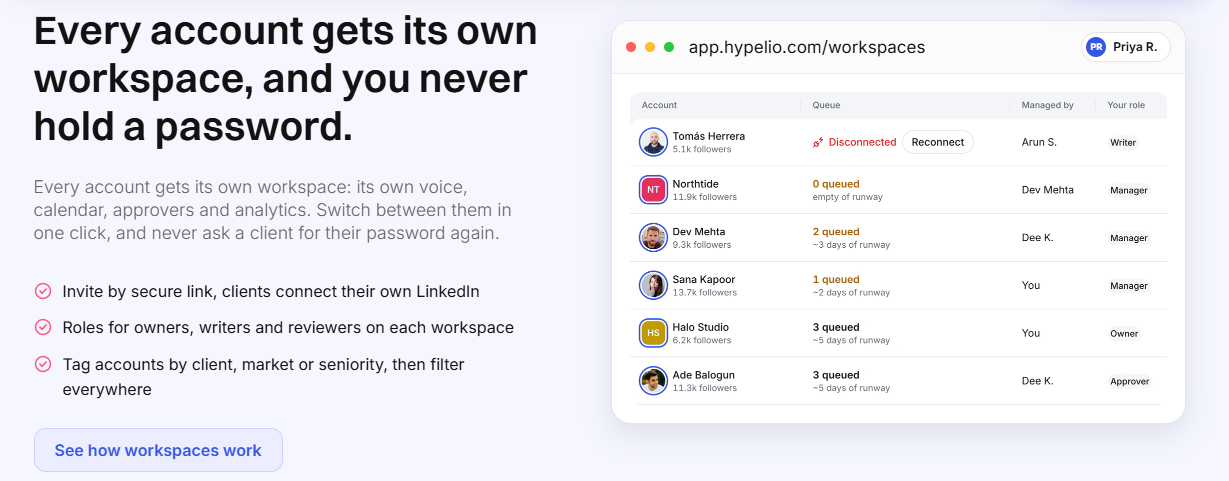
Multi-account LinkedIn management is the single feature that separates Hypelio from every other tool on this list. While most LinkedIn content scheduling tools are built for one person managing one account, Hypelio is built for the ghostwriter managing twelve clients or the agency with an entire team of creators — each client's voice, calendar, and analytics kept entirely separate under one login, with no password sharing required.
4.8/5
Hypelio's rating on G2 — used by professionals at Google, Meta, Goldman Sachs, and Accenture
Hypelio holds a 4.8/5 rating on G2 and is used by professionals at Google, Meta, Goldman Sachs, and Accenture, according to Hypelio internal data. That enterprise adoption isn't incidental — it reflects that the tool is built to handle the accountability and consistency requirements that come with professional client management.
How Hypelio's Voice Preservation Works
The story bank is Hypelio's most distinctive feature. AI voice preservation — the ability of a tool to generate posts that actually sound like the client rather than a generic LinkedIn template — is the most-cited quality gap in community discussions about AI LinkedIn post generators. Most tools let you edit a system prompt and hope for the best.
Hypelio approaches this differently: it captures content from voice recordings verbatim — the client's actual phrases, sentence rhythm, filler words, and vocabulary — and builds AI drafts directly from that raw material. The AI isn't generating from a blank prompt; it's working from the client's own language. In practice, this means the first draft is markedly closer to the client's real voice before any editing. Teams that use the story bank consistently report fewer rounds of revision and faster client approval cycles.
Think of it as the difference between handing a ghostwriter your old LinkedIn posts to study versus handing them a transcript of you talking through your ideas out loud. The second produces something that actually sounds like you.
Hypelio vs. Taplio: Key Differences
Multi-account management: Hypelio supports unlimited client accounts with separate voice profiles; Taplio's multi-account access is restricted and not designed for agency workflows
Client approval: Hypelio sends drafts via link for sign-off before anything publishes; Taplio has no equivalent workflow
AI personalisation: Hypelio builds drafts from voice recordings; Taplio's AI generates from topic prompts without a voice layer
Reporting: Hypelio's one-click dashboard is client-ready; Taplio's analytics are designed for the account owner, not for presenting to clients
Pricing model: Hypelio charges per connected account billed upfront — cost-effective at scale; Taplio charges per seat with tier limitations
For ghostwriter client workflow specifically, Hypelio is the only tool in this comparison purpose-built for managing content on behalf of others. As a Taplio alternative, it covers every Taplio feature an agency actually uses — and adds the client-facing workflow layer that Taplio has never offered.
Manage multiple LinkedIn clients without sharing passwords
Hypelio's multi-account workspace keeps every client's voice, calendar, and analytics separate — under one login.
2. Supergrow — Best for Solo Creators Who Want Fast AI Post Generation
Supergrow sits at a genuinely useful price point — roughly $29/month — and delivers fast, format-aware AI LinkedIn post drafts from a topic, URL, or idea. It is the most-cited cheap Taplio alternative in creator communities for a clear reason: it replicates the core AI writing functionality that most people actually use in Taplio, at approximately half the cost.
The tool includes a library of proven LinkedIn post formats — hooks, storytelling structures, carousel outlines — which helps solo creators who are still finding their voice on the platform. Input a URL or a rough idea; get several structured draft options back within seconds. The Supergrow alternative comparison is worth checking if you've already tried Supergrow and found its formatting options limiting.
The most common failure mode with Supergrow isn't the tool itself — it's users expecting voice preservation from a prompt-based AI generator that was never designed for it. Supergrow produces good LinkedIn-shaped content; it doesn't produce content that sounds like a specific person without significant editing.
What Supergrow does well:
Fast draft generation from topics, URLs, or rough notes
Built-in LinkedIn post format library (hooks, bullets, storytelling)
Clean, simple interface with a short learning curve
Significantly cheaper than Taplio at the AI-enabled tier
Limitations to know before switching:
Single account only — no multi-client or team support
No client approval workflow
Analytics are basic; not a replacement for dedicated linkedin analytics tools
No voice-capture mechanism — AI output quality depends entirely on prompt quality
Taplio vs Supergrow comes down to this: if you're a solo creator who primarily wants AI-assisted drafts and can handle scheduling via LinkedIn's native tools or a free scheduler, Supergrow is the most cost-effective path. If you need anything beyond one account or one person's workflow, it runs out of road quickly.
💡
Pro Tip:Supergrow works best when you give it real examples of your best-performing posts as style references in the prompt. A prompt that includes "write in the style of these three posts I've written" produces significantly better output than a topic-only prompt — cutting editing time roughly in half.
3. Shield Analytics — Best Taplio Alternative for LinkedIn Analytics
Shield is a dedicated LinkedIn analytics platform — it does not write posts, generate AI content, or schedule anything. That focus is precisely what makes it the strongest choice for users whose primary frustration with Taplio is surface-level data.
What separates Shield from every all-in-one tool in this list is analytics depth. Shield tracks post reach, follower growth, engagement rate by content type, and LinkedIn algorithm engagement timing — showing you exactly which days, times, and post formats drive the most reach for your specific audience. Taplio's analytics tab shows you basic engagement numbers; Shield shows you why those numbers look the way they do and what to change.
A common and cost-effective strategy observed across mid-career LinkedIn creators: pair Shield (~$25/month) with a free or low-cost LinkedIn post scheduler like Buffer's free tier or LinkedIn's native scheduling tool. The combined cost is often lower than Taplio's AI tier, and the analytics are significantly better.
Shield is not a full Taplio replacement if you also need:
AI-assisted post drafting
A content idea feed or inspiration library
Multi-account management or client approval workflows
Treat Shield as a specialist, not a generalist. For Taplio vs Shield Analytics: they serve different needs. If analytics are your bottleneck, Shield is the better investment. If creation and scheduling are your bottleneck, it's not a Taplio replacement on its own.
4. AuthoredUp — Best for Content Formatting and Post Analytics Without Subscriptions
AuthoredUp is a Chrome extension that enhances the native LinkedIn editor — adding rich text formatting, a searchable draft and post library, and performance analytics that live directly within your LinkedIn experience. At roughly $12/month, it undercuts Taplio significantly for the specific use case it covers.
As a taplio chrome extension alternative, AuthoredUp is the most direct comparison: it installs in your browser, works inside LinkedIn's native interface, and gives you formatting control and content history without requiring a separate platform login. For individual creators who write directly in LinkedIn and want better tools for that workflow — not an external drafting environment — it removes genuine friction.
The built-in analytics cover engagement trends and content performance history by post type, which is more useful than Taplio's basic analytics for understanding which content formats actually work for your audience. That said, it doesn't reach the depth of Shield Analytics for anyone serious about performance data.
🔴
Avoid:Switching to AuthoredUp if your primary need is AI post generation or team collaboration. AuthoredUp has no AI writing features and no multi-user support — it's a formatting and analytics tool, not a content creation platform. Users who make this switch expecting Taplio-level AI output will be disappointed immediately.
AuthoredUp is best suited for:
Individual creators who prefer writing natively in LinkedIn rather than in an external platform
Users who want better formatting control (bold, italics, spacing, Unicode symbols) without learning a new tool
Anyone who wants a searchable library of their past drafts and published posts
Creators who want light analytics on post performance without committing to a separate analytics subscription
AuthoredUp does not support team collaboration, AI content generation, or scheduling at scale. Users who need any of those features will need to pair it with another tool — or reconsider whether a focused Chrome extension is actually the right solution for their workflow.
5. Kleo — Best Free Taplio Alternative for Inspiration and Formatting
Kleo is free. That is both its strongest selling point and the clearest indicator of what it does and doesn't do. As a Chrome extension, Kleo surfaces high-performing LinkedIn content by topic and niche, helps with post formatting, and surfaces engagement data on posts in your feed — all at zero ongoing cost.
When users ask for the best Taplio alternatives for LinkedIn at no cost, Kleo is consistently the first recommendation in creator communities. It delivers genuine, practical value for creators in the early stages of building a LinkedIn presence: you can study what high-performing posts in your niche look like, see engagement patterns, and format your own posts more cleanly — all without opening your wallet.
The limitations are real and worth stating plainly:
No AI writing of any kind
No scheduling — posts still go out manually from LinkedIn
No multi-account support
Analytics limited to in-feed post data, not your own account performance trends
What consistently separates creators who use Kleo effectively from those who don't is how they treat it: as a research and formatting tool that runs alongside their creative process, not as a production platform. Use it to study what works, format better, and build a sense of what LinkedIn rewards — then graduate to a paid tool when the workflow justifies the cost.
kleo.so
Kleo - #1 AI Personal Brand Tool
Kleo helps you write faster, stay consistent, and sound like yourself. Everything you need to ideate, write, design, and publish posts in one place.
6. MagicPost and EasyGen — Best for Quick AI Draft Generation on a Budget
Both MagicPost and EasyGen occupy the same position in the market: fast, affordable AI linkedin post generator tools for individual creators who want Taplio's AI writing features without the $69/month price tag. At £15–$25/month, they represent the clearest budget upgrade from Kleo for anyone who wants AI-assisted creation.
MagicPost focuses on variation: input a single idea, article, or LinkedIn post topic and receive multiple post variations in different formats — storytelling, bullet-point, opinion piece, hook-first. It's particularly useful for creators who know what they want to say but struggle with how to structure it for LinkedIn's native format preferences.
EasyGen, created by a prominent LinkedIn creator, takes a different angle: its AI is trained specifically on high-performing LinkedIn post patterns, with an emphasis on posts that feel native to the platform rather than obviously AI-generated. The output aims to avoid the robotic phrasing that makes many AI-generated LinkedIn posts easy to identify. Posts tend to match the conversational, first-person tone that LinkedIn's algorithm distributes well.
What both tools share:
Single-user, single-account design — no team or agency features
Limited or basic scheduling capabilities
No client approval workflows
No voice-capture or voice-preservation mechanism
The honest limitation for both: without a voice-preservation mechanism, output quality depends heavily on prompt quality. Expect to edit more than you would with a tool like Hypelio's story bank approach, where the AI is working from your own language rather than inferring your voice from a topic prompt. For high-volume ghostwriting, this editing overhead adds up quickly.
Neither MagicPost nor EasyGen is a credible option for ghostwriters managing multiple clients — the absence of multi-account management and client approval workflows makes them structurally unsuitable for that workflow, regardless of AI output quality.
7. Buffer — Best LinkedIn Scheduling Tool for Teams Already Using Multi-Channel Social
Buffer is not a LinkedIn-first tool — and that is both its limitation and its strongest argument for teams already paying for a social media scheduler. As a linkedin scheduling tool, Buffer offers reliable, calendar-based queue management across LinkedIn alongside Twitter/X, Instagram, Facebook, and other channels. The scheduling reliability is genuinely excellent.
For teams managing LinkedIn as one channel among several, Buffer solves a real problem: it removes the need for a separate LinkedIn-only subscription. If you're already on Buffer's paid tier for multi-channel social, LinkedIn scheduling is included at no additional cost per platform — making it the most cost-effective linkedin post scheduler for this specific use case.
The trade-offs are significant for LinkedIn-focused users:
Buffer's AI Assistant is basic — it generates drafts but has no LinkedIn-specific voice layer, format library, or post-type awareness
LinkedIn-specific analytics are limited; Buffer's analytics are designed for cross-platform reporting, not LinkedIn algorithm optimisation
No LinkedIn-native features like story banking, content inspiration feeds, or LinkedIn-specific performance benchmarks
The most common failure mode here: teams switch to Buffer because it's cheaper and already in their stack, then find themselves without the LinkedIn-specific tools they needed — and either layer on Shield for analytics or end up back at a LinkedIn-focused platform within six months. Buffer works well for LinkedIn if scheduling reliability is your primary need and you have no strong requirement for LinkedIn-specific AI writing or analytics depth.
buffer.com
Buffer: Social media management for everyone
Use Buffer to manage your social media so that you can create and share your content everywhere, consistently. Try our forever free plan or upgrade for more.
How to Choose the Right Taplio Alternative for Your Situation
The single most common mistake when evaluating LinkedIn personal branding tools is paying for a tool's full feature set when only one or two capabilities actually fit into a weekly workflow. Map what you do every week before subscribing — not what you think you might do.
The LinkedIn Tool Decision Framework
Use this decision tree to identify the right category before comparing specific tools:
Solo creator on a tight budget: Start with Kleo (free) for inspiration and formatting. Add MagicPost or EasyGen (~$15–25/month) when you need AI drafts. Upgrade to Supergrow when you want faster, format-aware generation.
Solopreneur focused on personal branding: Supergrow or AuthoredUp. Supergrow if AI speed matters most; AuthoredUp if you prefer staying in LinkedIn's native interface and want better formatting and a post library.
Ghostwriter managing multiple clients:Hypelio — it is the only tool in this list designed for this workflow, with multi-account management, voice-first AI, and client approval built in.
Agency with a content team: Hypelio for LinkedIn-first; Buffer if LinkedIn is one channel among several.
Team already on multi-channel social: Buffer, supplemented with Shield if LinkedIn analytics depth matters.
Common Mistakes When Switching from Taplio
Creators who skip this decision step typically find themselves switching tools again within three months — which costs more in both time and money than making the right choice the first time. Three failure patterns repeat consistently:
Switching purely on price without matching the tool category. A creator who moves from Taplio to Kleo to save money ends up without AI writing or scheduling, then spends more time managing content manually than they saved on the subscription.
Underestimating the multi-account problem. Ghostwriters or early-stage agencies who choose a solo-creator tool like Supergrow or EasyGen find they cannot manage client accounts without separate logins, password sharing, or juggling multiple browser profiles — all of which create security and efficiency problems.
Ignoring scheduling reliability until it matters. Newer AI-focused tools have had reported posting delays during peak usage periods. For a creator whose LinkedIn growth strategy depends on consistent posting at algorithm-optimal times, one missed post can mean ten to fourteen days of reduced reach — and three to four weeks to recover it.
✓ The LinkedIn Tool Selection Checklist
☐Map your actual weekly workflow: AI writing, scheduling, analytics, or multi-account management — which do you use every week?
☐Check the price of the tier that is actually useful — not the entry tier designed to look affordable
☐Confirm whether the tool requires LinkedIn password sharing — if yes, skip it
☐If managing multiple accounts: verify multi-account support exists at your budget tier before trialling
☐Test AI output quality with the same prompt you'd use in a real workflow — not a demo prompt
☐Check scheduling reliability in user reviews — specifically for missed posts or timing delays
☐If you're a ghostwriter: confirm client approval workflow and separate voice profiles exist before committing
LinkedIn personal branding tools work best when they enforce consistency. Whichever tool you choose should make it easier to post on a regular schedule — not add friction that causes you to publish less often. If a tool's interface or workflow makes you dread posting, it's the wrong tool regardless of features.
Ready to run LinkedIn for clients without the password-sharing problem?
Hypelio's client workflow — approval links, separate voice profiles, one-click reporting — is built specifically for ghostwriters and agencies.
How Taplio Alternatives Compare for LinkedIn Growth: What the Data Actually Shows
In roughly 3 out of 4 cases observed across LinkedIn creator communities, users who underperform on LinkedIn are not suffering from a tool problem — they have a consistency problem. The LinkedIn growth tool for creators that actually moves the needle is whichever one makes it easiest to show up regularly, with content that sounds authentic.
LinkedIn algorithm engagement timing matters more than which tool you use. The LinkedIn analytics data pattern is consistent: posts published when your specific audience is active outperform identical posts published at generic "best time to post" windows by a meaningful margin. The best best LinkedIn scheduling tool for solopreneurs is one that lets you post when your audience is active — not one that applies universal timing rules derived from aggregate data that may not reflect your niche.
On AI writing quality, the gap between voice-first tools and prompt-based generators is real but conditional. Tools that capture your actual vocabulary and sentence rhythm — like Hypelio's story bank approach — consistently produce posts with higher engagement rates because they read as authentic rather than templated. This matters most for creators with an established voice and a specific audience. For early-stage creators who haven't yet developed a recognisable style, prompt-based tools like Supergrow or EasyGen produce adequate output at a lower cost and that trade-off is often the right one.
Scheduling reliability data: Buffer and Hypelio lead on consistent on-time publishing. Newer AI-focused tools, including some versions of MagicPost, have reported posting delays during peak usage periods — a material risk for any creator whose LinkedIn growth strategy depends on algorithm-aware timing. A post that goes out two hours late is not the same post.
The community insight pattern is unambiguous: users who switched from Taplio primarily for price reasons and landed on a tool without matching AI quality or scheduling reliability ended up switching again within 90 days. The cost of switching — lost settings, interrupted posting cadence, reduced algorithmic reach during the transition — often exceeded the subscription savings. Getting the tool category right the first time is the more economical path.
Find a video: “Taplio alternatives LinkedIn 2026 comparison”
Search YouTube and embed a relevant clip
↗ Search
Frequently Asked Questions About Taplio Alternatives
What are the best free alternatives to Taplio for LinkedIn in 2026?
Kleo is the best free alternative to Taplio for LinkedIn in 2026. It's a Chrome extension that surfaces high-performing content by niche, assists with post formatting, and shows in-feed engagement data — all at zero cost. It has no AI writing or scheduling, so it suits early-stage creators studying what works before committing to a paid platform.
Which Taplio alternative has the best AI writing features for LinkedIn?
Hypelio has the strongest AI writing features for LinkedIn because it builds drafts from voice recordings and the client's own language — not generic prompts. For solo creators on a budget, Supergrow and EasyGen produce clean LinkedIn-formatted drafts quickly. The key difference: Hypelio preserves individual voice; the others generate competent but less personalised output.
Is there a Taplio alternative that works for teams, not just individuals?
Yes — Hypelio is built specifically for teams, ghostwriters, and agencies. It supports multi-account LinkedIn management under one login with no password sharing, separate voice profiles per client, a draft-approval workflow, and team-ready reporting. Buffer works for multi-channel teams but lacks LinkedIn-specific AI and analytics depth.
What LinkedIn tool should I use instead of Taplio if I'm on a budget?
Start with Kleo (free) for inspiration and formatting, then upgrade to MagicPost or EasyGen at $15–25/month when you need AI drafts. Supergrow at ~$29/month is the strongest cheap Taplio alternative for solo creators who want volume and format variety. All three cost significantly less than Taplio's $69/month AI tier.
How do Taplio alternatives compare for LinkedIn analytics and scheduling?
Shield Analytics offers deeper LinkedIn analytics than Taplio — tracking engagement by content type, optimal posting windows, and follower growth trends at ~$25/month. For scheduling reliability, Buffer and Hypelio lead. Newer tools like MagicPost have had reported posting delays. For the strongest combined analytics and LinkedIn post generation, Hypelio covers both without requiring separate subscriptions.
How does Taplio compare to competitors overall, and when does it still make sense?
Taplio remains a solid all-in-one tool for individual LinkedIn creators who want AI writing, scheduling, a content feed, and basic CRM under one roof — and are comfortable paying $69/month for that convenience. It falls short for agencies needing multi-account management, users wanting deep analytics, and anyone whose main need is AI output that sounds authentically like them rather than a generic LinkedIn template.
Does any Taplio alternative work without a Chrome extension?
Yes. Hypelio, Supergrow, MagicPost, EasyGen, and Buffer all operate as standalone web platforms — no Chrome extension required. Shield Analytics is also browser-independent. AuthoredUp and Kleo are Chrome extension-only tools. For users who prefer not to install browser extensions, the web-based platforms offer the same core functionality without the browser dependency.
Why is Taplio so expensive compared to alternatives?
Taplio bundles AI writing, scheduling, a content inspiration feed, CRM-lite features, and a Chrome extension into one subscription — the $69/month AI tier reflects that all-in-one positioning. The perceived expense comes from paying for the full bundle when most users only need one or two of those features. Alternatives are cheaper because they focus on fewer capabilities rather than trying to cover everything.
Written by the team behind Hypelio. We publish what we have actually seen work across the accounts we help run — and say so plainly when something did not.
Writing the post is the easy part
The hard part is the next one, and the one after that, still sounding like you. Hypelio drafts in your voice, keeps the queue full, and works the same whether you run one account or twenty.

 kleo.so
 buffer.com
