Honest Taplio review for 2026: features, pricing plans, AI writing quality, pros and cons, and who Taplio is actually best for — including top alternatives.
Taplio is an all-in-one LinkedIn content and growth platform targeting creators, founders, and marketers who want to build a LinkedIn presence without manually managing every moving part. It covers AI-assisted post writing, scheduling, a lightweight CRM, and analytics — all inside a single LinkedIn-only dashboard. That focused scope is both its clearest strength and the source of its most debated limitation: the AI output. A pattern observed across hundreds of user reviews and community threads is that Taplio's default AI drafts read as polished but generic — usable as a starting point, rarely publishable without real editing. Whether that's a fundamental flaw or a fixable workflow problem is precisely what this review sets out to answer.
Key Takeaways
Who this is for: Individual creators, founders, and solopreneurs building a LinkedIn presence — less suited to agencies managing multiple client profiles.
What you'll learn: Honest breakdown of every major Taplio feature, real pricing figures, and a direct answer to whether the AI output can actually sound like you.
Taplio's rating on G2 is 3.9/5 based on reviews as of June 2026 — lower than many competitor tools in this category.
The AI writing gap: Default output is consistently described as robotic; the fix requires deliberate prompt engineering, not just turning it on.
Price vs. value: The all-in-one positioning only holds if you actively use the CRM and analytics — AI writing alone rarely justifies the cost.
Most counterintuitive finding: Taplio can help grow your LinkedIn following, but the growth mechanism is consistent human-guided publishing — not autonomous AI-driven reach.
Taplio is a LinkedIn-only content management and growth platform. That narrow focus — it does not support Twitter/X, Instagram, or any other network — means every feature is built around how LinkedIn's algorithm and content format actually work, rather than being adapted from a generic social scheduler.
Key Features at a Glance
The core Taplio features break down into four distinct areas:
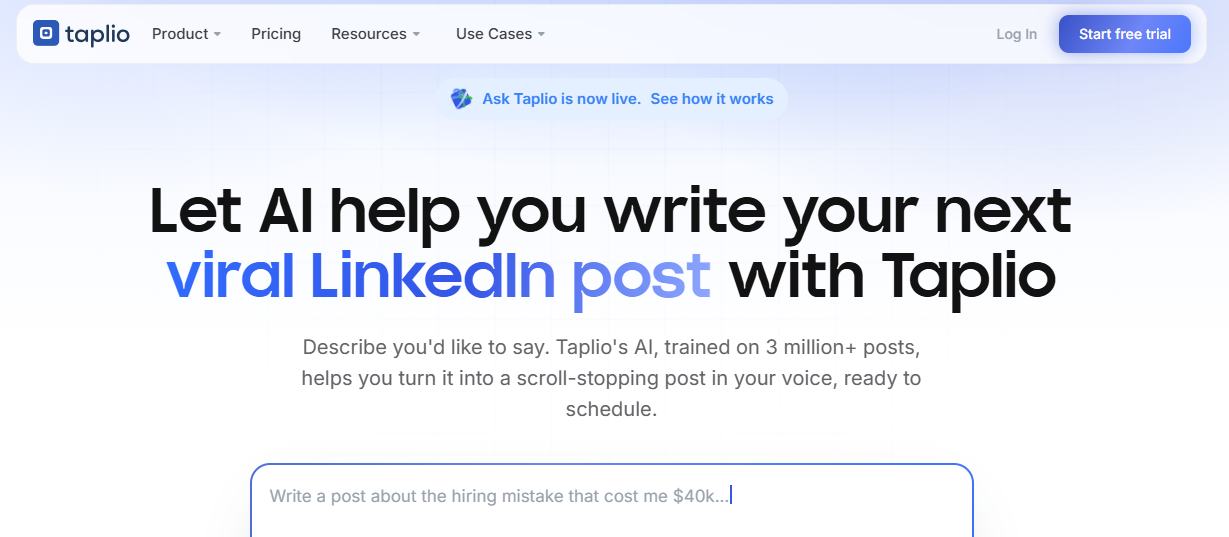
AI post writing: Generate LinkedIn post drafts from a prompt, a URL, or a viral post template. The taplio ai writer is the most-marketed feature.
Content scheduling: Queue posts with optimal timing suggestions based on your audience's activity. The taplio LinkedIn scheduling tool is one of the platform's most reliable components.
CRM and relationship manager: Track contacts, set follow-up reminders, and monitor who is engaging with your content — a lightweight social selling layer built into the same dashboard.
Analytics: Post-level performance data, follower growth tracking, and engagement breakdowns.
Chrome extension: The taplio chrome extension sits inside your LinkedIn feed, letting you save inspiring posts, engage directly, and draft replies without leaving the platform.
Inspiration feed: A curated feed of high-performing posts in your niche, filtered by engagement — useful for identifying what content formats are working in your space right now.
💡
Pro Tip:The Chrome extension is genuinely useful even if you're on the fence about other Taplio features. Saving viral posts to your inspiration library directly from your feed takes seconds and builds a reference bank you'll actually use when you're staring at a blank draft.
Taplio also includes a taplio linkedin video downloader function and a taplio x cross-posting capability for sharing content beyond LinkedIn, though both are secondary to the platform's core positioning. Understanding the full feature surface sets an honest baseline for evaluating whether the pricing is proportionate to what you actually use.
Taplio Pricing Plans 2026: How Much Does Taplio Cost?
Taplio Pricing Plans 2026
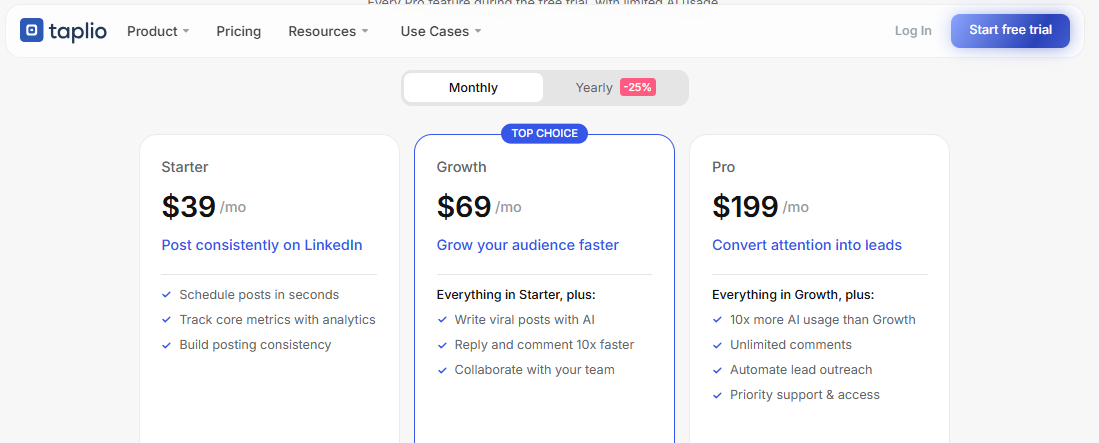
Taplio pricing sits firmly in the premium tier for LinkedIn tools. The entry-level plan starts at around $39/month on annual billing, with the full-featured plan reaching approximately $65/month annually — both prices for a single LinkedIn profile. Month-to-month billing runs noticeably higher, making the annual commitment the only realistic option if you plan to stay beyond a trial period.
Taplio — By the Numbers
3.9/5
G2 rating (June 2026)
~$39
Entry plan per month (annual billing)
10,000+
Professionals using Taplio worldwide
According to Magicpost's Taplio review (2026), Taplio holds a 3.9/5 rating on G2 based on reviews as of June 2026 — a meaningful signal when you're weighing a premium subscription. The AuthoredUp review (2026) rates Taplio's scheduling at 4.5/5 but its content creation at just 3.5/5, with the note that AI output "needs heavy editing" — a consistent pattern across independent reviews.
Taplio pricing plans in brief:
Plan
Monthly Cost (Annual)
Best For
Key Limit
Starter
~$39/mo
Individual creators, solopreneurs
Limited AI credits, no advanced CRM
Pro
~$65/mo
Active creators using CRM + analytics
Single profile only
Agency add-on
Per seat, varies
Agencies managing client profiles
No shared workspace or approval flow
Is the Taplio Free Trial Worth Using?
The Taplio free trial gives you access to core features for a limited period — enough to test the scheduler and run a few AI drafts. It is worth using specifically to answer one question: does the AI output, with your prompts and your content, produce drafts you'd actually publish? If the answer after the trial is "only with significant editing every time", that's your answer on value. Don't skip the trial and commit annually without testing the AI writing feature on your own topics.
Taplio's AI Writing: Does It Actually Sound Like You?
The honest answer to "Does Taplio AI write LinkedIn posts that sound like me?" is: sometimes, with effort. The taplio ai generator does produce full LinkedIn post drafts quickly. The more important question — the one community discussions keep returning to — is whether those drafts are authentically human or detectably generic.
The gap between a default Taplio prompt and a publishable post isn't a bug. It's the gap between AI as a shortcut and AI as a drafting partner — and that gap only closes when you actively shrink it through prompt engineering.
Common Mistakes That Make Taplio Output Sound Generic
Creators who skip deliberate prompt setup typically find the AI defaults to LinkedIn clichés: "I'm thrilled to share...", vague lessons from unnamed experiences, and emoji-heavy bullet-point structures that read identically to hundreds of other posts. The most common failure mode is treating Taplio as a finished-post machine rather than a first-draft accelerator.
What genuinely improves output quality:
Seed the prompt with your own phrases. Copy in a paragraph of text written in your voice — from an email, a Slack message, a past post — before asking Taplio to generate anything.
Add a specific, named example. Generic prompts produce generic outputs. "Write a post about leadership" gives Taplio almost nothing. "Write a post about the time I lost a client because I over-explained a proposal" gives it something to work with.
Define a contrarian stance. Tell the AI your actual opinion — including where you disagree with conventional advice. Posts that take a position outperform posts that observe neutrally.
Edit the first line every time. AI-generated LinkedIn hooks are almost always weak. Rewrite the first line manually. This one change improves the entire post.
The burden of this improvement falls on the user. Taplio does not capture your voice by default — it generates from pattern. Users who invest in prompt engineering for LinkedIn get meaningfully better results; users who don't consistently report the "robotic" output problem. That's a fair limitation to name clearly.
⚠️
Warning:Publishing AI-generated posts without editing is the fastest route to a disengaged audience. LinkedIn's algorithm rewards consistent engagement signals — and followers who detect robotic content disengage faster than the algorithm can compensate. A slow, well-edited content calendar outperforms a fast, generic one every time.
Taplio Pros and Cons: Honest Assessment
Four things Taplio does genuinely well, and four where it falls short.
Taplio pros:
Integrated LinkedIn content workflow: Scheduler, inspiration feed, CRM, and analytics in one place. No tool-switching.
Reliable scheduling: Consistent posting at optimal times is one of the simplest levers for LinkedIn growth, and Taplio's scheduler handles it well.
Chrome extension: Genuinely useful for in-feed engagement and post saving without breaking your LinkedIn browsing flow.
Social selling CRM: If you're actively doing outbound on LinkedIn, the relationship manager adds real value that most scheduler-only tools don't provide.
Taplio cons:
AI voice authenticity is limited by default: Generic output unless you invest significant time in prompt customisation — which not all users will do.
Price-to-value tension: At the Pro tier, it's hard to justify if you're only using scheduling and AI writing. The value case needs CRM and analytics to be active.
No true multi-account workspace: Agencies managing multiple client profiles will find the architecture inconvenient and the per-seat costs add up quickly.
Social selling automation risk: LinkedIn's terms of service restrict automated interactions. Taplio's engagement features operate in a grey zone — users should read the platform's ToS carefully before activating bulk engagement tools.
Who Is Taplio Best For?
Taplio is best suited to individual creators or founders who are actively building a personal LinkedIn brand, want one dashboard rather than three separate tools, and are willing to invest time in prompt engineering to get usable AI output. It is less well-suited to ghostwriting tool scalability scenarios — managing five or more client profiles with distinct voices, approval workflows, and separate analytics reporting.
Managing LinkedIn for clients or multiple accounts?
Hypelio is built for exactly that — with a story bank that captures each client's voice and a client approval workflow before anything publishes.
Is Taplio Worth It? Can It Actually Grow Your LinkedIn Following?
Taplio can grow your LinkedIn following — but it is worth being precise about the mechanism. The growth comes from disciplined, consistent publishing enabled by the tool, not from the tool generating reach autonomously. Teams that publish 3–5 times per week with edited, specific posts consistently see follower growth; teams that use Taplio to publish unedited AI drafts at the same frequency typically plateau or see engagement drop.
2×
More engagement on LinkedIn posts that include images, compared to text-only posts
According to LinkedIn's own content guidance, posts with images receive 2× more engagement than text-only posts. In practice, this means the visual assets you pair with Taplio-drafted posts matter as much as the copy — a point most Taplio reviews overlook entirely.
The honest answer to is Taplio worth it depends on three variables:
If you're replacing three separate tools (scheduler + CRM + analytics), the combined cost comparison can favour Taplio.
If you only need AI writing assistance, cheaper or free alternatives exist — and several produce less generic output with less prompt engineering required.
If you're managing multiple client profiles, the per-seat cost model and absence of a proper approval workflow make alternatives worth modelling carefully before committing.
Is Taplio Safe to Use?
Taplio is generally safe from an account security standpoint — it connects via OAuth and does not require your LinkedIn password. The more relevant risk is LinkedIn's terms of service, not data security. Taplio's automated engagement features — bulk connection requests, automated comments, mass CRM interactions — fall into a category LinkedIn has increasingly restricted. Users who activate these features heavily have reported temporary profile restrictions. The safest approach is to use Taplio's scheduling and analytics actively, and treat the engagement automation features with caution.
Taplio vs. Alternatives: Best LinkedIn Content Tools in 2026
What separates top-performing LinkedIn tools from the rest in 2026 is not feature count — it is how well the tool handles AI voice authenticity at scale. That single variable drives most switching decisions among experienced LinkedIn users and ghostwriters.
hypelio.com
The Taplio alternative built for a roster, not a profile
Taplio is strong on lead generation. Hypelio is built for running many accounts, with the price published.
Taplio vs Shield Analytics is not really a head-to-head decision — Shield is a pure analytics tool with no scheduling or AI writing. Many serious LinkedIn creators use both: Taplio or a similar tool for publishing, Shield for performance reporting. If analytics depth is your primary need, Shield offers more granular data at a lower price point.
When to Choose Taplio Over Alternatives
Taplio makes the most sense when all three of these are true: you're managing a single LinkedIn profile, you're committed to investing time in prompt setup rather than expecting polished output by default, and you want CRM functionality alongside scheduling without paying for a separate tool. If any one of those conditions doesn't hold — particularly the single-profile constraint — the value case weakens quickly.
For ghostwriters and agencies managing multiple client profiles, Hypelio takes a structurally different approach: a story bank that captures content directly from voice recordings in the client's own words, a client approval workflow that prevents anything publishing without sign-off, and per-account billing that stays predictable as the client roster grows. That architecture directly addresses the two gaps Taplio users raise most consistently — voice authenticity and ghostwriting tool scalability.
The right choice for best LinkedIn content tools 2026 depends less on feature lists and more on your use case: solo creator building a personal brand, or operator managing multiple clients at scale. Those are genuinely different problems requiring genuinely different tools.
🔴
Avoid:Choosing a LinkedIn tool based on feature count alone. Taplio has more features than most alternatives — but features you don't actively use don't add value. Model what you'll actually use, then price it. A tool with three features you use daily beats one with twelve you ignore.
Ready to compare Taplio against tools built for authentic LinkedIn content?
Hypelio is rated 4.8/5 on G2 and used by teams at Google, Meta, and Goldman Sachs — built specifically for LinkedIn content that sounds like a real person wrote it.
☐Define how many LinkedIn profiles you need to manage — single or multiple changes the tool architecture you need.
☐Test AI output on 3+ real topics during the free trial — not demo prompts, your actual content.
☐Confirm whether you need a client approval workflow before anything publishes.
☐Model the total annual cost at your expected number of accounts, not just the per-seat headline price.
☐Check whether the tool connects via OAuth (safe) or asks for your LinkedIn password (never acceptable).
☐Read the tool's terms of service on automated engagement features before activating them.
☐Publish at least 10 posts using the tool before judging output quality — the first few are almost always your worst.
Hypelio
Frequently Asked Questions About Taplio
Is Taplio safe to use?
Taplio is safe from a data security standpoint — it uses OAuth, so your LinkedIn password is never shared. The real risk is LinkedIn's terms of service: Taplio's automated engagement and bulk outreach features can trigger account restrictions if used aggressively. Use scheduling and analytics freely; treat automation features with more caution.
Is Taplio the best tool for growing a LinkedIn audience in 2026?
Taplio is a competitive option for solo creators who want an all-in-one platform, but it is not the strongest tool for every use case. Its 3.9/5 G2 rating (June 2026) reflects real user frustration with AI output quality. For ghostwriters or agencies, tools purpose-built for multi-account management and voice authenticity tend to deliver better results.
What are the main limitations of using Taplio for LinkedIn growth?
Taplio's three most significant limitations are: AI output that reads as generic without deliberate prompt engineering, no true multi-account workspace for agency use, and a price point that is hard to justify if you're not actively using both the CRM and analytics features alongside scheduling. The automation features also carry a LinkedIn ToS risk worth understanding before activating.
How does Taplio's AI content feature compare to writing posts manually?
Taplio AI produces first drafts faster than writing from scratch — but the default output requires meaningful editing to sound human. Manual writing or voice-input tools that capture your exact phrasing produce more authentic results with less revision. Taplio AI is best treated as a drafting accelerator, not a finished-post generator.
Which Taplio pricing plan is best for solopreneurs?
The Starter plan (~$39/month on annual billing) covers scheduling and basic AI writing for a single profile — sufficient for most solopreneurs testing the platform. Upgrade to Pro only if you actively use the CRM and need deeper analytics. The free trial is the right first step before committing to either plan.
Does Taplio integrate with other marketing tools?
Taplio offers integrations with tools including Zapier, HubSpot, and several CRM platforms, enabling basic workflow connections. Its integrations are functional but not extensive — it is primarily a closed LinkedIn-focused ecosystem. If deep CRM integration or multi-channel content workflow is a priority, evaluate whether Taplio's integration depth meets your stack requirements before subscribing.
What is the overall verdict on the Taplio review 2026?
Taplio is a capable LinkedIn tool that works best for individual creators who use all its features actively. It falls short for agencies, ghostwriters, and anyone expecting polished AI output without significant prompt investment. Worth trialling — not worth committing to without a clear plan for how you'll use the CRM and analytics, not just the AI writer.
What consistently separates LinkedIn accounts that grow from accounts that plateau is not the tool — it is the discipline of publishing specific, edited, opinionated content on a consistent schedule. Taplio can support that discipline. It cannot replace it.
Written by the team behind Hypelio. We publish what we have actually seen work across the accounts we help run — and say so plainly when something did not.
Writing the post is the easy part
The hard part is the next one, and the one after that, still sounding like you. Hypelio drafts in your voice, keeps the queue full, and works the same whether you run one account or twenty.

 hypelio.com